
One key has stopped responding, or perhaps entire rows of letters have suddenly stopped working? How many keys aren’t working tells us a great deal about the cause — and the good news is that in many cases the repair is quicker and cheaper than you’d think. During a free inspection (5–15 minutes) we can see straight away what we’re dealing with.
In short: if one key isn’t working, it’s usually just dust underneath it — cleaning is enough. If an entire row or strip of keys isn’t working, it almost always means moisture has got into the keyboard — keyboards „die in strips”.
Most common causes — from most to least likely
- Dust under a single key — one letter doesn’t respond or responds unreliably, the rest of the keyboard works normally.
- Liquid damage or moisture — an entire row or clear strip of keys stops working at once, sometimes random characters also appear.
- Cracked plastic keycap — an increasingly common fault in newer, thinner keyboard designs.
- Keyboard cable damage — the entire keyboard stops working at once, usually after careless disassembly or bending of the casing.
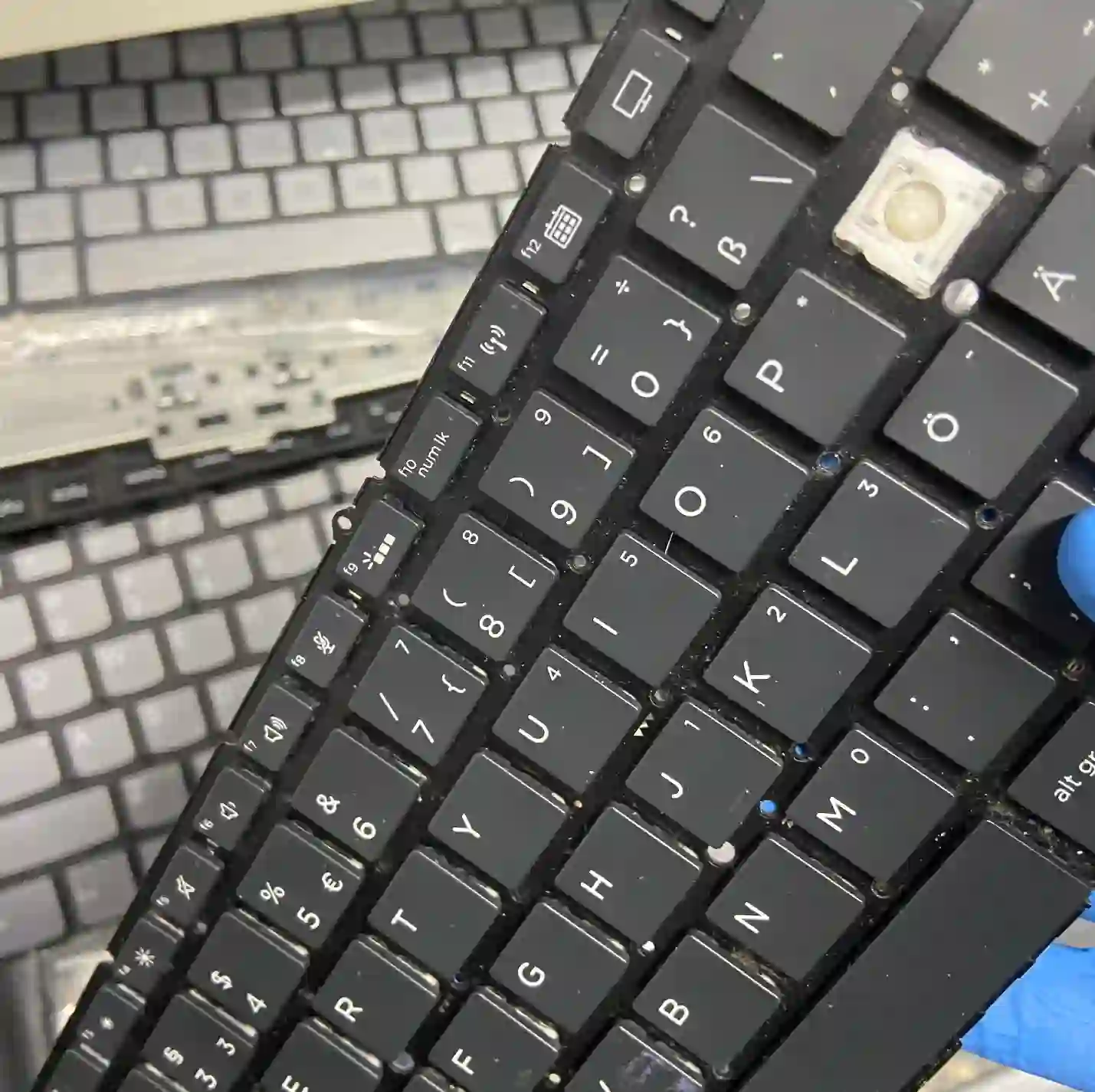
What you can check yourself before you come in
- Count exactly how many keys aren’t working and whether they form a clear row or strip — this is the most important diagnostic clue.
- Try to remember whether anything was spilt on the keyboard recently, even a small amount of liquid.
- Check whether the problem disappears after restarting the laptop, or whether it persists constantly.
- Connect an external USB keyboard to check whether the problem affects only the keyboard or the entire system.
What NOT to do
- Don’t try to remove keys yourself — it’s easy to break the delicate mounting mechanism underneath.
- Do not clean the keyboard with any liquid „dry” without first disconnecting the laptop from power.
- Do not continue using the laptop after liquid damage, hoping it will „dry out on its own” — the sooner it reaches the service centre, the greater the chance of avoiding additional damage.
A single key that doesn’t work is usually just dust — cleaning is enough. But when an entire row stops working at once, it’s almost always moisture. Keyboards don’t die one letter at a time in such cases, but in whole strips — and that really helps with quick diagnosis.
Apenfix technician
How we diagnose it
1. Mapping non-working keys
We check with a keyboard tester which keys exactly are not responding and whether they form a row or strip.
2. Inspection under a single key
For single faults, we check the condition of the mechanism and the presence of dust under the specific key.
3. Checking for traces of moisture
For damage affecting an entire strip of keys, we check under the keyboard for traces of liquid damage.
4. Decision: cleaning or replacement
Based on this, we determine whether cleaning is sufficient or keyboard replacement is necessary.
Extended diagnostics, if needed, takes 1–3 working days. It’s free if you decide to proceed with the repair — if you choose not to, its cost is determined and quoted in advance.
Laptop keyboard repair — we serve all of Warsaw
We accept laptops with non-working keyboards from customers in every district of Warsaw — Śródmieście, Wola, Mokotów, Ochota, Żoliborz, Bemowo, Bielany, Ursynów, Praga-Południe, Praga-Północ, Targówek, Białołęka, Wawer, Włochy, Ursus, Wilanów, Rembertów and Wesoła — as well as from the surrounding areas.
We have more than one location in convenient parts of Warsaw, so getting to us is quick and easy wherever you live or work. Our current service point addresses are listed further down this page.
Why Apenfix
Frequently asked questions
Does one non-working key mean replacing the entire keyboard?
Usually not — in such cases, cleaning is enough, without the need to replace the entire keyboard.
I spilt something on the keyboard, what now?
Turn off the laptop immediately and don’t try to turn it back on — the sooner it gets to the service centre, the lower the risk of additional damage.
Do you replace just the keyboard, or the entire top case?
We replace the keyboard itself — thanks to our proprietary keyboard removal technique and 3D methods, there’s no need to replace the entire topcase.
The plastic keycap has broken — can this be repaired?
Yes, we check the availability of the keycap itself or, if that’s not possible, we replace the relevant section of the keyboard.
How long does keyboard repair take?
Usually 1–3 working days, depending on parts availability and the extent of the damage.
The repair cost depends on the scope — from cleaning a single key to replacing the entire keyboard. Current rates can be found in the price list.
Two service points in Warsaw
Visit whichever of our two locations is more convenient for you.
Location 1 — Wolska
Wolska 50A/Lokal 26
01-187 Warszawa
Location 2 — al. Szucha
al. Jana Chrystiana Szucha 1
00-580 Warszawa
