
Water-damaged Lenovo laptop in Warsaw — every minute counts. Disconnect the power, turn off the laptop, flip it keyboard-down and get to the repair centre as quickly as possible. The faster you act, the better the chance of saving your device.
What to do immediately after spilling liquid on your laptop
Before you read the rest of this page — follow these steps. The order matters.
- Disconnect the laptop from power and turn it off immediately.
- Flip the laptop upside down on the side where the liquid spilled — if you spilled something on the keyboard, turn it keyboard-down. The idea is to stop gravity from pulling the liquid deeper into the motherboard.
- Get to the repair centre as quickly as possible so we can disconnect the battery. This is the most important step — as long as the battery is connected, there’s voltage on the board.
- Don’t turn the laptop on to „check if it works”. Don’t dry it with a hairdryer or put it in rice.
The most important thing is to save the motherboard. You need to flip the laptop upside down so the liquid doesn’t flow deeper, and get to the repair centre as quickly as possible so we can disconnect the battery. There’s no time to spare — you can’t afford to wait even a second.
Apenfix technician
In short: Repairing a water-damaged Lenovo laptop in Warsaw means disconnecting the battery as quickly as possible and thoroughly cleaning the motherboard of liquid and corrosion. Success depends primarily on whether a short circuit occurred on the board — and how quickly the device reaches the repair centre.
Our experience — Lenovo laptops after liquid damage
At our repair centre in Warsaw, we’ve carried out 16 repairs of Lenovo laptops after liquid damage — it’s the brand we see most often with these cases. Most commonly, these are models from the IdeaPad, ThinkPad, Legion and Yoga series.
When you’re looking for help after spilling liquid on your laptop
You’ve found this page because you’re searching for answers to questions like: I spilled liquid on my laptop what do I do, I spilled coffee on my keyboard, water-damaged laptop won’t turn on or laptop liquid damage repair Warsaw. These are all the same situation — and in every case, time is critical.
What determines whether a laptop can be saved
One factor matters most:
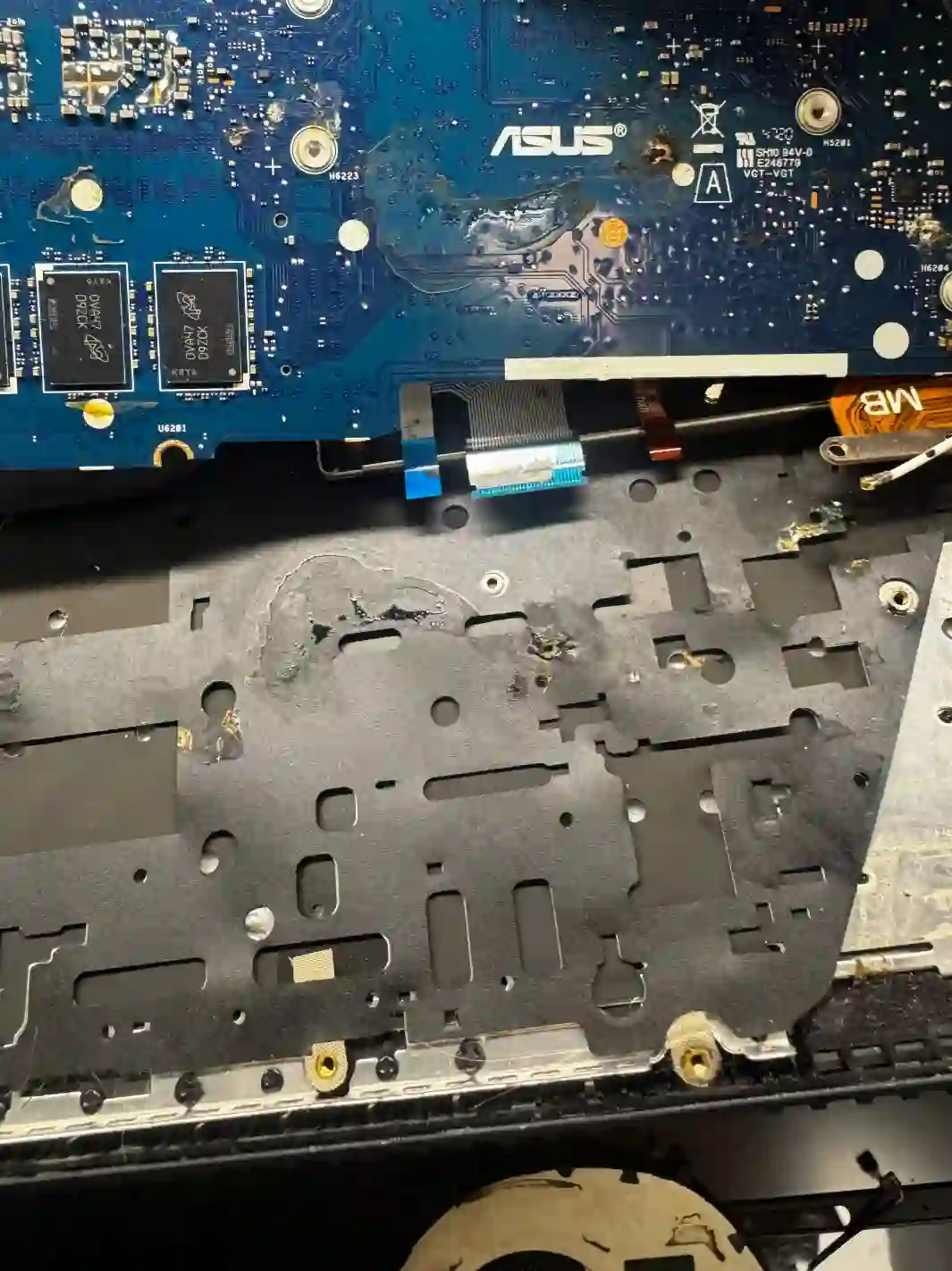
It mainly depends on whether a short circuit occurred on the motherboard — that is, whether moisture reached the board. That’s what decides everything. If the customer acts quickly and brings the laptop in straight away, and we disassemble and clean it promptly, there’s a good chance the device will either be fully saved or only a minor component will stop working — for example, just the keyboard itself.
Apenfix technician
There’s one more thing worth knowing: even if a laptop was damaged by liquid a while ago and hasn’t turned on since, there’s still a chance that after thorough cleaning to remove corrosion, it will start working again. Don’t assume from the outset that the device is lost — bring it in for diagnostics.
What happens if you delay
- Liquid seeps deeper — from the keyboard onto the motherboard, where damage is most expensive
- Corrosion forms — over time, moisture eats away at traces and contacts on the board
- A connected battery maintains voltage — this increases the risk of a short circuit and permanent damage
- What could have been a cleaning job turns into a motherboard replacement
How we save water-damaged laptops
1. Battery disconnection
We immediately open the laptop and disconnect the battery — that’s priority number one.
2. Disassembly
We take the device apart to assess how far the liquid has travelled.
3. Cleaning
We remove liquid and corrosion from the motherboard and components.
4. Testing
We check what works and tell you straight what has been saved.
Above we describe how the process looks in our service centre. This is not a DIY repair guide — with liquid-damaged equipment, unskilled attempts to power it on can seal the fate of the motherboard.
Liquid-damaged Lenovo laptop repair — we serve all of Warsaw
We accept liquid-damaged Lenovo laptops from customers in every Warsaw district — Śródmieście, Wola, Mokotów, Ochota, Żoliborz, Bemowo, Bielany, Ursynów, Praga-Południe, Praga-Północ, Targówek, Białołęka, Wawer, Włochy, Ursus, Wilanów, Rembertów and Wesoła — as well as from the surrounding areas.
We have more than one location in convenient parts of Warsaw, so getting to us is quick and easy wherever you live or work. Our current service point addresses are listed further down this page.
Why Apenfix
Frequently asked questions
I spilled liquid on my laptop — what should I do first?
Disconnect the power, turn off the laptop, flip it upside down with the affected side facing down, and get to the service centre as quickly as possible so we can disconnect the battery. Do not turn the device on and do not dry it with a hairdryer.
How much time do I have?
Practically none. The faster we disconnect the battery and clean the motherboard, the greater the chance of saving the laptop. This is one of the few faults where minutes count.
Is it worth bringing in a laptop that was damaged by liquid a long time ago?
Yes. Even if the device hasn’t turned on for a long time, after thorough cleaning of corrosion there is a chance it will start working again. The inspection is free.
Does rice help with a liquid-damaged laptop?
No. Rice does not remove liquid from inside the casing or stop corrosion, and the time wasted on such attempts works against you. The only effective solution is to quickly disconnect the battery and have the motherboard cleaned at a service centre.
Can data be recovered from a liquid-damaged laptop?
Usually yes — the hard drive typically survives liquid damage better than the motherboard. Even if the laptop won’t start, data can usually be recovered.
Prices for all services can be found in our price list.
Two service points in Warsaw
Visit whichever of our two locations is more convenient for you.
Location 1 — Wolska
Wolska 50A/Lokal 26
01-187 Warszawa
Location 2 — al. Szucha
al. Jana Chrystiana Szucha 1
00-580 Warszawa
See also
- HP liquid damage repair
- Lenovo keyboard replacement
- Lenovo hard drive replacement
- Lenovo cooling system cleaning
