
Liquid-damaged HP laptop in Warsaw — every minute counts. Disconnect the power, turn off the laptop, flip it keyboard-side down and get to the repair centre as quickly as possible. The faster you act, the better the chance of saving your device.
What to do immediately after spilling liquid on your laptop
Before you read the rest of this page — follow these steps. The order matters.
- Disconnect the laptop from power and turn it off immediately.
- Flip the laptop so the side that got wet is facing down — if you spilled liquid on the keyboard, turn it keyboard-side down. The idea is to stop gravity from pulling the liquid deeper into the motherboard.
- Get to the repair centre as quickly as possible so we can disconnect the battery. This is the most important step — as long as the battery is connected, there’s voltage on the motherboard.
- Don’t turn the laptop on to „check if it works”. Don’t dry it with a hairdryer or put it in rice.
The most important thing is to save the motherboard. You need to flip the laptop so the wet side is facing down to stop the liquid from running deeper, and get to the repair centre as quickly as possible so we can disconnect the battery. There’s absolutely no time to spare — you can’t afford to wait even a second.
Apenfix technician
In short: Repairing a liquid-damaged HP laptop in Warsaw means disconnecting the battery as quickly as possible and thoroughly cleaning the motherboard of liquid and corrosion. Success depends primarily on whether a short circuit occurred on the motherboard — and how quickly the device reaches the repair centre.
Our experience — HP laptops after liquid damage
At our Warsaw repair centre, we’ve completed 8 repairs of HP laptops after liquid damage, and we’ve serviced this brand for dozens of other faults. The models we see most often are from the Victus, Envy, Pavilion and OmniBook series.
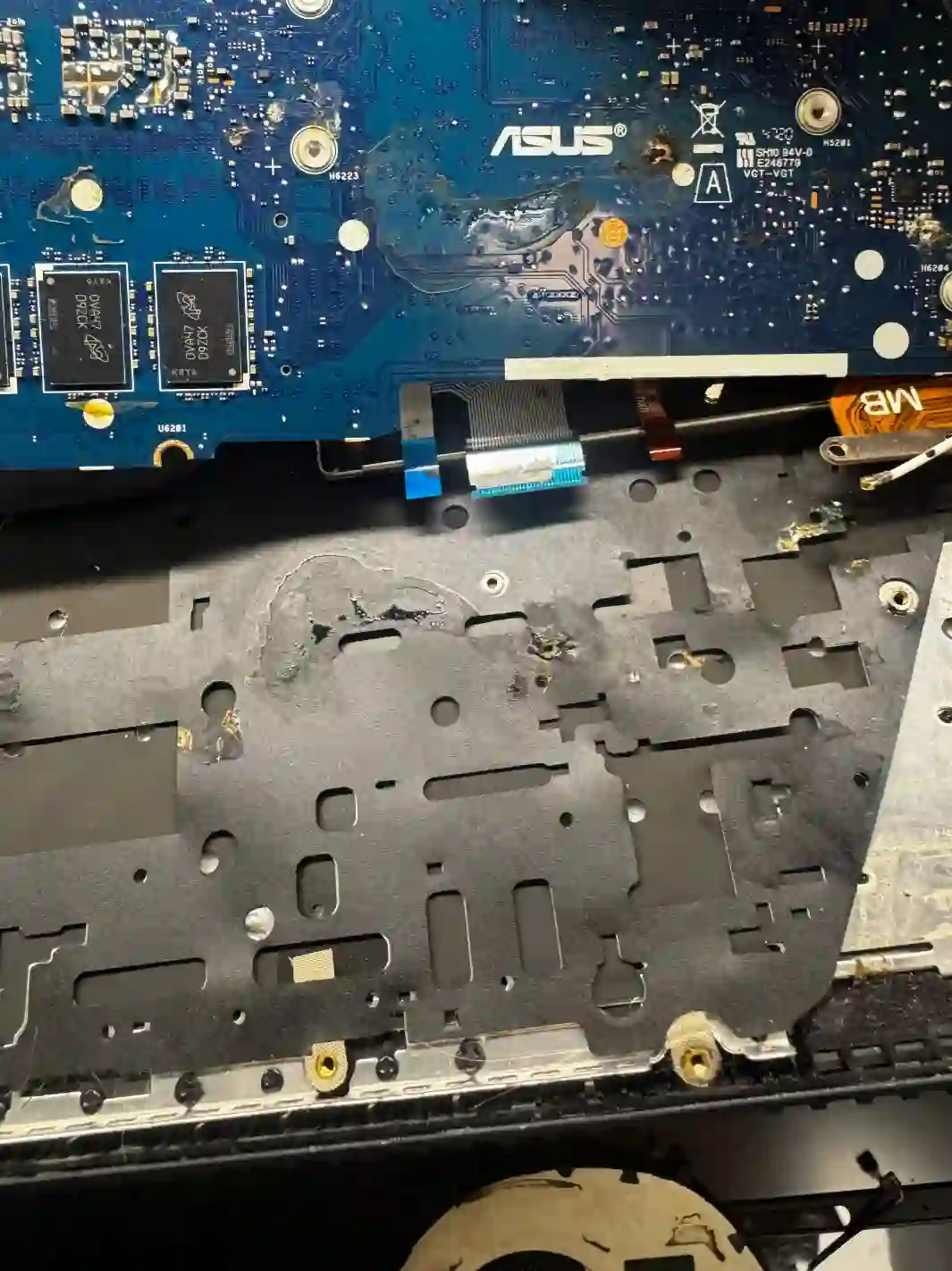
In HP gaming laptops, the stakes are higher
Liquid damage always hurts, but in Victus and OMEN models the consequences can be more expensive. These are machines with powerful processors and dedicated graphics cards — the motherboard is significantly more expensive than in an office laptop. If the liquid manages to reach the motherboard and causes a short circuit, the repair can cost as much as a substantial portion of the device’s value.
That’s why with a gaming HP, it’s even more important not to risk trying to turn it on 'just to check’. A single attempt to power up a water-damaged laptop can seal the motherboard’s fate.
When you’re looking for help after liquid damage
You’ve found this page if you’re searching for answers to questions like: spilled liquid on my laptop what to do, spilled coffee on keyboard, water-damaged HP laptop won’t turn on or laptop liquid damage repair Warsaw. These are all the same situation — and in every case, time is critical.
What determines whether the laptop can be saved
It mostly depends on whether a short circuit occurred on the motherboard — in other words, whether moisture reached the board. That’s what decides everything. If the customer acts quickly and brings the laptop in straight away, and we disassemble and clean it promptly, there’s a good chance the device will either be fully saved, or only some minor component will stop working — for example, just the keyboard itself.
Apenfix technician
Sometimes after liquid damage a laptop works normally, but some keys stop responding. That’s quite a typical scenario — in that case, only the keyboard needs replacing, not the motherboard. It’s also worth knowing that even a laptop damaged by liquid some time ago, which hasn’t started since, has a chance of coming back to life after thorough corrosion removal.
What happens if you delay
- Liquid seeps deeper — from the keyboard down to the motherboard, where damage is most expensive
- Corrosion develops — over time, moisture eats away at traces and contacts on the board
- A connected battery maintains voltage — this increases the risk of short circuits and permanent damage
- What could have been a cleaning job turns into a motherboard replacement
How we rescue water-damaged laptops
1. Battery disconnection
We immediately open the laptop and disconnect the battery — that’s priority number one.
2. Disassembly
We disassemble the device to assess how far the liquid has spread.
3. Cleaning
We remove the liquid and corrosion from the motherboard and components.
4. Testing
We check what works and tell you straight what can be saved.
The above describes the process at our service centre. This is not a DIY repair guide — with liquid damage, inexpert attempts to power on the device can destroy the motherboard.
HP laptop liquid damage repair — we serve all of Warsaw
We accept liquid-damaged HP laptops from customers in every Warsaw district — Śródmieście, Wola, Mokotów, Ochota, Żoliborz, Bemowo, Bielany, Ursynów, Praga-Południe, Praga-Północ, Targówek, Białołęka, Wawer, Włochy, Ursus, Wilanów, Rembertów and Wesoła — as well as from the surrounding areas.
We have more than one location in convenient parts of Warsaw, so getting to us is quick and easy wherever you live or work. Our current service point addresses are listed further down this page.
Why Apenfix
Frequently asked questions
I’ve spilt liquid on my HP laptop — what should I do first?
Disconnect the power, turn off the laptop, flip it upside down with the affected side facing down, and get to the service centre as quickly as possible so we can disconnect the battery. Do not turn the device on and do not dry it with a hairdryer.
How much time do I have?
Practically none. The sooner we disconnect the battery and clean the motherboard, the better the chance of saving the laptop. This is one of the few faults where every minute counts.
After the spill, everything works except the keyboard — what now?
That’s a fairly typical and relatively good scenario — it means the motherboard has survived. Usually replacing just the keyboard is enough.
Does rice help with a liquid-damaged laptop?
No. Rice doesn’t remove liquid from inside the casing and doesn’t stop corrosion, and the time wasted on such attempts works against you. The only effective solution is to quickly disconnect the battery and have the motherboard cleaned at a repair centre.
Can data be recovered from a water-damaged laptop?
Usually yes — the drive typically survives liquid damage better than the motherboard. Even if the laptop won’t start, data can usually be recovered.
Prices for all services can be found in our price list.
Two service points in Warsaw
Visit whichever of our two locations is more convenient for you.
Location 1 — Wolska
Wolska 50A/Lokal 26
01-187 Warszawa
Location 2 — al. Szucha
al. Jana Chrystiana Szucha 1
00-580 Warszawa
See also
- Lenovo liquid damage repair
- HP cooling system cleaning
- HP battery replacement
- Lenovo keyboard replacement
