
Lenovo laptop charging port repair in Warsaw — the charger moves around in the socket, the laptop only charges in one position or doesn’t draw power at all. We replace ports and repair traces on the motherboard. Repair usually takes 1–3 working days.
In brief: Lenovo laptop charging port repair in Warsaw starts with determining whether the problem actually lies in the port, or perhaps in the power adapter or battery. We have microscopes and a soldering station, which allows us to repair damaged traces on the motherboard and replace ports, including USB-C. We service ThinkPad, IdeaPad, Legion, Yoga and ThinkBook series. Repair usually takes 1–3 working days.
Our experience — charging port repair in Lenovo laptops
At our service centre in Warsaw, we have carried out 12 charging port repairs in Lenovo laptops. We most often see models from the Legion, ThinkPad and IdeaPad series.
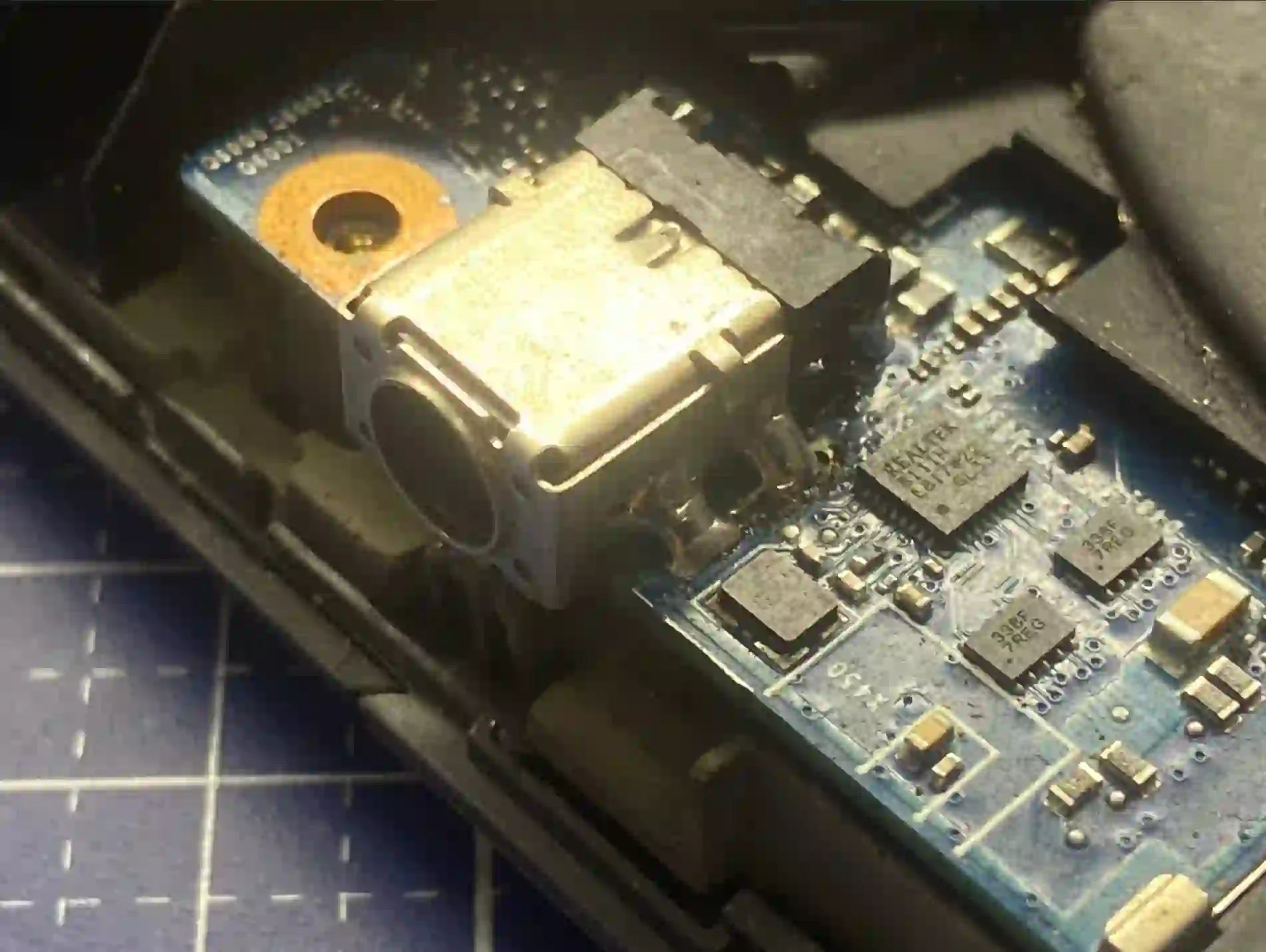
How to recognise that the problem is in the port
This is the most common question — because symptoms of no charging can have three different causes: the port, the power adapter or the battery. Here are the signs pointing specifically to the port:
- The plug moves loosely in the socket — there’s no single fixed position where it stays put
- The laptop only charges in one position of the plug — you move the cable sideways and charging cuts out
- The battery is charged, the laptop works normally, but when you plug in the power adapter, no current flows at all
- The port looks loose or pushed into the casing
The characteristic symptom is that the plug moves loosely in the socket — you move it and the laptop starts charging, shift it the other way and charging disappears. Second sign: if you connect the power adapter through a tester and you can see the current reads zero, that also points to the port. But the problem may also lie in the charger itself — you need to check whether any current is coming out of it at all. And if current is flowing but the battery still isn’t charging, that’s a sign the problem is in the battery.
Apenfix technician
That’s why we always start with measurement — we check whether the power adapter is delivering current, whether the port is receiving it and whether the battery is charging. Only this shows where the fault actually lies and allows us to avoid repairing the wrong component.
When you’re looking for charging port repair
You’ve found this page if you’re looking for answers to questions like: laptop not charging, laptop only charges in one position, loose power socket in laptop or charging port repair Warsaw. It’s all one service — charging port repair or replacement.
What happens if you delay charging port repair
A damaged charging port is not a fault you can ignore for months — it leads to further problems:
- The battery deteriorates — power is supplied unevenly, flowing intermittently, and such cycles are very harmful to the battery
- The port becomes increasingly loose — the play inside grows with each connection
- A short circuit may occur — and that means motherboard damage, which is the most expensive repair
- What starts as a simple port replacement becomes a port plus battery repair, and sometimes the motherboard too
We also repair what others won’t take on
If it’s a USB-C port, we can reconstruct the traces on the motherboard because we have microscopes and professional equipment. We have a soldering station, so we carry out repairs of any difficulty level — even CPU replacements. We have no problem regenerating all traces on the motherboard and replacing USB-C ports.
Apenfix technician
This is an important difference. Many repair services, when faced with a damaged USB-C port or broken traces, send the customer away saying a complete motherboard replacement is necessary. In such cases, we regenerate the traces under a microscope — the repair costs a fraction of a new motherboard.
How charging port repair works at our service centre
1. Testing
We check with a tester whether power is coming from the charger and whether the port is receiving it.
2. Diagnosis
We determine whether the fault lies in the port, the charger, or the battery.
3. Repair
Charging port replacement and, if necessary, trace regeneration under a microscope.
4. Testing
We check charging stability and return the device with a warranty.
The above describes the process at our service centre. This is not a DIY repair guide — working with ports and traces requires a soldering station and microscope, so we recommend contacting a service centre.
Lenovo charging port repair — we serve all of Warsaw
We accept Lenovo laptops with charging problems from customers in every Warsaw district — Śródmieście, Wola, Mokotów, Ochota, Żoliborz, Bemowo, Bielany, Ursynów, Praga-Południe, Praga-Północ, Targówek, Białołęka, Wawer, Włochy, Ursus, Wilanów, Rembertów and Wesoła — as well as from surrounding areas.
We have more than one location in convenient parts of Warsaw, so getting to us is quick and easy wherever you live or work. Our current service point addresses are listed further down this page.
Why Apenfix
Frequently asked questions
How much does Lenovo charging port repair cost?
It depends on the scope — a simple port replacement costs less than regenerating damaged traces on the motherboard. Current rates are available in our price list, and we’ll provide a quote after a free inspection.
How do you know if it’s the port or the charger?
We use a tester to check whether current is coming out of the power supply at all. If it is, but the laptop isn’t receiving it — the problem is in the port. If current is flowing but the battery isn’t charging, the cause usually lies in the battery itself.
Do you repair USB-C ports?
Yes. We have microscopes and a soldering station, so we replace USB-C ports and regenerate damaged traces on the motherboard — without replacing the entire motherboard.
Can you delay charging port repair?
It’s not worth it. Unevenly supplied current damages the battery, and a loose port can lead to a short circuit and motherboard damage.
How long does charging port repair take?
Usually 1–3 working days. Motherboard trace repair may require a bit more time.
Prices for all services can be found in our price list.
Two service points in Warsaw
Visit whichever of our two locations is more convenient for you.
Location 1 — Wolska
Wolska 50A/Lokal 26
01-187 Warszawa
Location 2 — al. Szucha
al. Jana Chrystiana Szucha 1
00-580 Warszawa
See also
- Lenovo battery replacement
- Lenovo keyboard replacement
- Lenovo cooling system cleaning
- Lenovo liquid damage repair
