
Have you spilt liquid on your Lenovo IdeaPad? Every minute counts. Repair usually takes 1–3 working days, but what you do in the first moments after the spill determines the outcome.
In short: if you’ve spilt liquid on your Lenovo IdeaPad, immediately disconnect the power, turn off the laptop, flip it upside down with the affected side facing downwards, and bring it to our service centre as quickly as possible so we can disconnect the battery. There’s absolutely no time to spare — how fast you react determines whether your IdeaPad can be saved in full.
Our experience with Lenovo IdeaPad
We’ve repaired 4 Lenovo IdeaPad laptops after liquid damage. This is Lenovo’s budget and mid-range line, carried daily in backpacks alongside water bottles or flasks, which means liquid damage occurs more frequently in this series than in laptops that stay on a desk all the time.
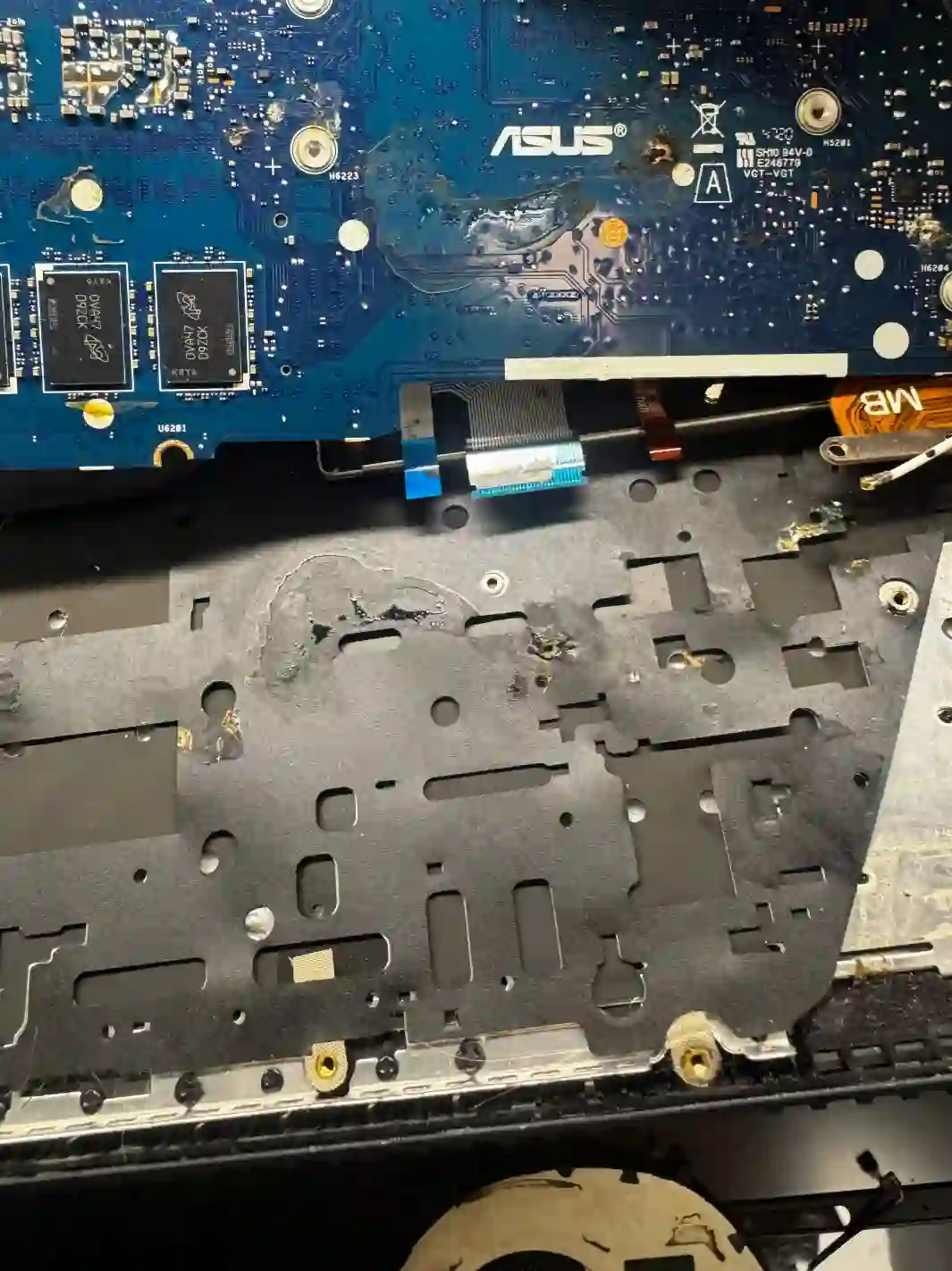
IdeaPad — an everyday companion more often exposed to liquids
The IdeaPad, as a laptop carried daily to school, university or cafés, is far more often near coffee, tea or water than a laptop that stays in one place. The good news is that IdeaPad parts are widely available, so if you reacted quickly, repair usually goes smoothly and without long waits for components.
When you’re looking for help with your IdeaPad
You find us by searching „spilt liquid on Lenovo IdeaPad what to do”, „liquid damage repair IdeaPad Warsaw” or „IdeaPad water damage won’t turn on”.
Symptoms after liquid damage
- Laptop won’t turn on at all after the spill
- Keyboard responds incorrectly or not at all
- Screen flickers or shows strange colours
- Laptop works but unstably or intermittently
With liquid damage there’s absolutely no time to spare — the faster we disconnect the battery, the greater the chance your laptop can be saved in full.
Apenfix technician
What happens if you delay
- Risk of short circuit on the motherboard and permanent component damage
- Corrosion of traces progressing with each passing hour
- Possible complete loss of data from the drive
How liquid damage repair works at our service centre
1. Immediate battery disconnection
We disconnect the battery as quickly as possible to stop further damage.
2. Short circuit assessment
We check whether a short circuit has occurred on the motherboard — this is crucial for the prognosis.
3. Cleaning and repair
We clean the interior and repair or replace damaged components.
4. Testing and warranty
We test the operation of all components and provide a minimum 3-month warranty.
Repair time may vary depending on parts availability and service centre workload.
IdeaPad liquid damage repair — we serve all of Warsaw
We accept IdeaPad laptops from customers in every Warsaw district — Śródmieście, Wola, Mokotów, Ochota, Żoliborz, Bemowo, Bielany, Ursynów, Praga-Południe, Praga-Północ, Targówek, Białołęka, Wawer, Włochy, Ursus, Wilanów, Rembertów and Wesoła — as well as from the surrounding areas.
We have more than one location in convenient parts of Warsaw, so getting to us is quick and easy wherever you live or work. Our current service point addresses are listed further down this page.
Why Apenfix
Frequently asked questions
I’ve spilt liquid on my IdeaPad — what should I do first?
Immediately disconnect the power, turn off the laptop, flip it upside down with the affected side facing downwards, and bring it to the service centre as quickly as possible.
Can I wait until tomorrow to visit the service centre?
Absolutely not — there’s no time to spare at all. The sooner we disconnect the battery, the greater the chance of fully saving the laptop.
Can data be recovered from an IdeaPad after liquid damage?
In many cases, yes — especially when the response was quick. We assess this individually after the inspection.
What determines whether an IdeaPad can be repaired at all?
Primarily whether a short circuit occurred on the motherboard and how quickly the laptop reached the service centre.
How long does IdeaPad repair take after liquid damage?
Usually 1–3 working days, depending on the extent of the damage.
The exact cost of Lenovo IdeaPad repair after liquid damage is determined individually after a free inspection. You’ll find the current price list under the button above.
Two service points in Warsaw
Visit whichever of our two locations is more convenient for you.
Location 1 — Wolska
Wolska 50A/Lokal 26
01-187 Warszawa
Location 2 — al. Szucha
al. Jana Chrystiana Szucha 1
00-580 Warszawa
See also
- Lenovo IdeaPad Diagnostics
- Lenovo IdeaPad Data Recovery
- Lenovo IdeaPad Keyboard Replacement
- Lenovo Legion Liquid Damage Repair
