
The plug in your Lenovo IdeaPad wobbles loosely in the socket and charging cuts out the moment you move the cable? This is a common problem in laptops carried daily in a backpack. Repair usually takes 1–3 working days.
In short: The IdeaPad, as a laptop carried daily in a backpack and plugged into the charger repeatedly, has a charging port exposed to mechanical wear. We use a tester to check whether any current is coming out of the power supply at all, and we repair or replace the damaged charging port in the IdeaPad.
Our experience with Lenovo IdeaPad
We have repaired the charging port in 2 Lenovo IdeaPad laptops. This is Lenovo’s budget and mid-range line — the most popular series for home and study, carried daily in a backpack, which puts additional mechanical stress on the charging port.
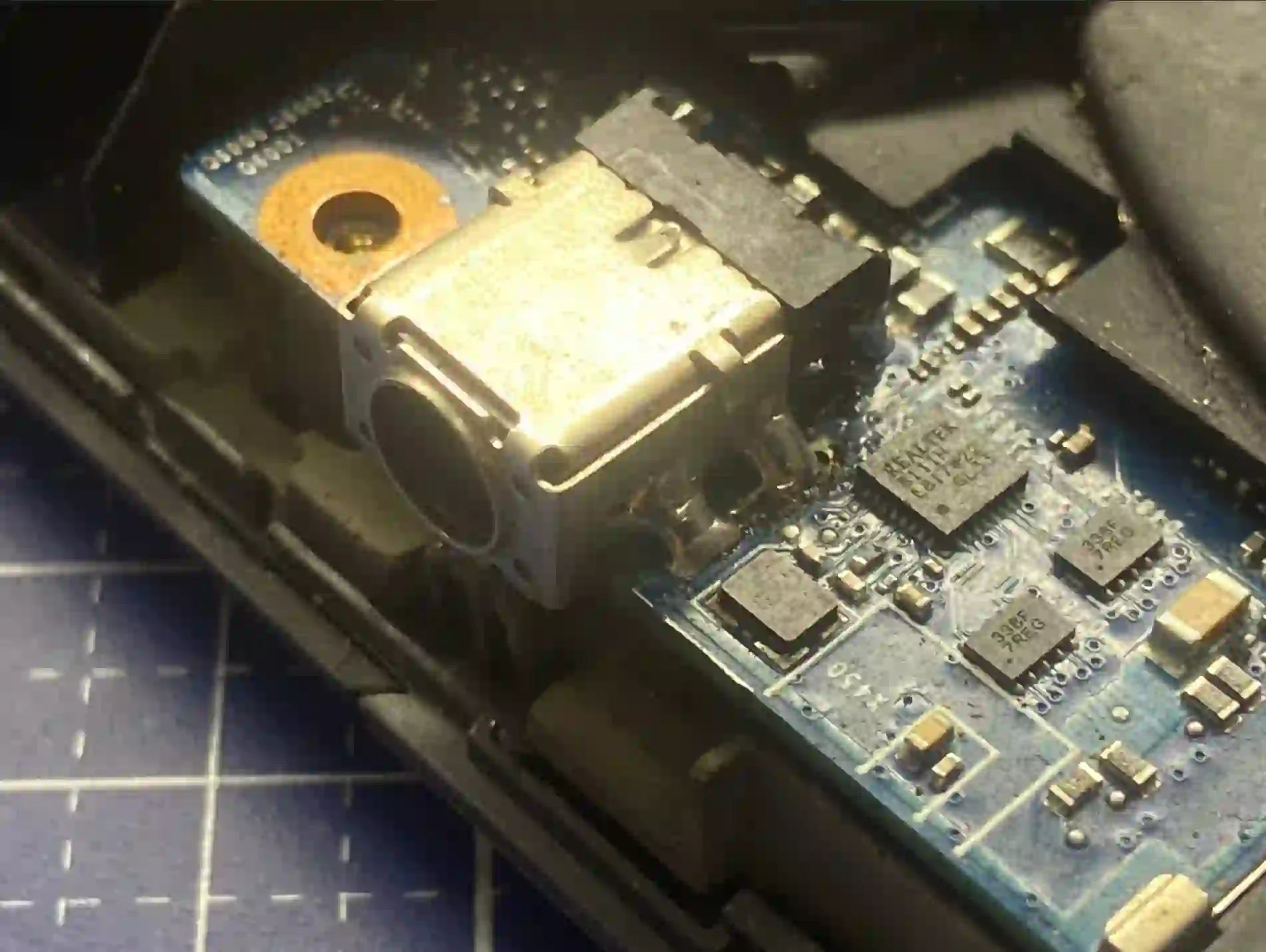
IdeaPad — charging port in daily use
The IdeaPad, as a laptop plugged in and unplugged from the charger multiple times every day — at school, at university, at home — has a charging port particularly exposed to mechanical wear. We have microscopes and track regeneration technology, so in many cases we repair the damaged port without having to replace the entire IdeaPad motherboard.
When you’re looking for help with your IdeaPad
You find us after typing „Lenovo IdeaPad not charging have to move cable”, „IdeaPad charging port repair Warsaw” or „IdeaPad loose charging socket”.
Symptoms of a damaged charging port
- Plug wobbles loosely in the socket
- Charging cuts out after gently moving the cable
- Laptop only charges in a specific plug position
- Laptop does not charge at all despite the power supply being plugged in
We always start with a tester — we check whether any current is coming out of the power supply at all before we open the IdeaPad casing.
Apenfix technician
What happens if you delay
- Uneven current damages the battery
- Risk of short circuit and motherboard damage
- Complete inability to charge the laptop
How charging port repair works at our service centre
1. Free inspection
We use a tester to check if current is coming from the power adapter — this takes 5–15 minutes.
2. Fault localisation
We determine whether the problem lies in the port or in the battery.
3. Regeneration or replacement
Under a microscope, we regenerate traces or replace the port, including USB-C ports.
4. Testing and warranty
We test charging at various plug angles and provide a minimum 3-month warranty.
Repair time may vary depending on parts availability and service centre workload.
IdeaPad charging port repair — we serve all of Warsaw
We accept IdeaPad laptops from clients in every Warsaw district — Śródmieście, Wola, Mokotów, Ochota, Żoliborz, Bemowo, Bielany, Ursynów, Praga-Południe, Praga-Północ, Targówek, Białołęka, Wawer, Włochy, Ursus, Wilanów, Rembertów and Wesoła — as well as from the surrounding areas.
We have more than one location in convenient parts of Warsaw, so getting to us is quick and easy wherever you live or work. Our current service point addresses are listed further down this page.
Why Apenfix
Frequently asked questions
How do you know it’s the charging port and not the battery?
We use a tester to check whether current is coming from the power supply. If current is present but the battery isn’t charging, the battery is at fault — when there’s no current, the problem lies in the charging port.
Can the charging port be repaired without replacing the entire motherboard?
In many cases yes, thanks to microscopes and circuit trace regeneration technology.
Why does the charging port in an IdeaPad wear out?
Daily plugging and unplugging of the charger, combined with carrying the laptop in a backpack, mechanically stresses the port over time.
What are the risks of continuing to use a laptop with a loose charging port?
Uneven current damages the battery, and in extreme cases it can lead to a short circuit and motherboard damage.
How long does charging port repair take for an IdeaPad?
Usually 1–3 working days.
The exact cost of charging port repair for a Lenovo IdeaPad is determined individually after a free inspection. You’ll find the current price list under the button above.
Two service points in Warsaw
Visit whichever of our two locations is more convenient for you.
Location 1 — Wolska
Wolska 50A/Lokal 26
01-187 Warszawa
Location 2 — al. Szucha
al. Jana Chrystiana Szucha 1
00-580 Warszawa
See also
- Lenovo IdeaPad diagnostics
- Lenovo IdeaPad keyboard replacement
- Lenovo IdeaPad screen replacement
- Lenovo Legion charging port repair
