
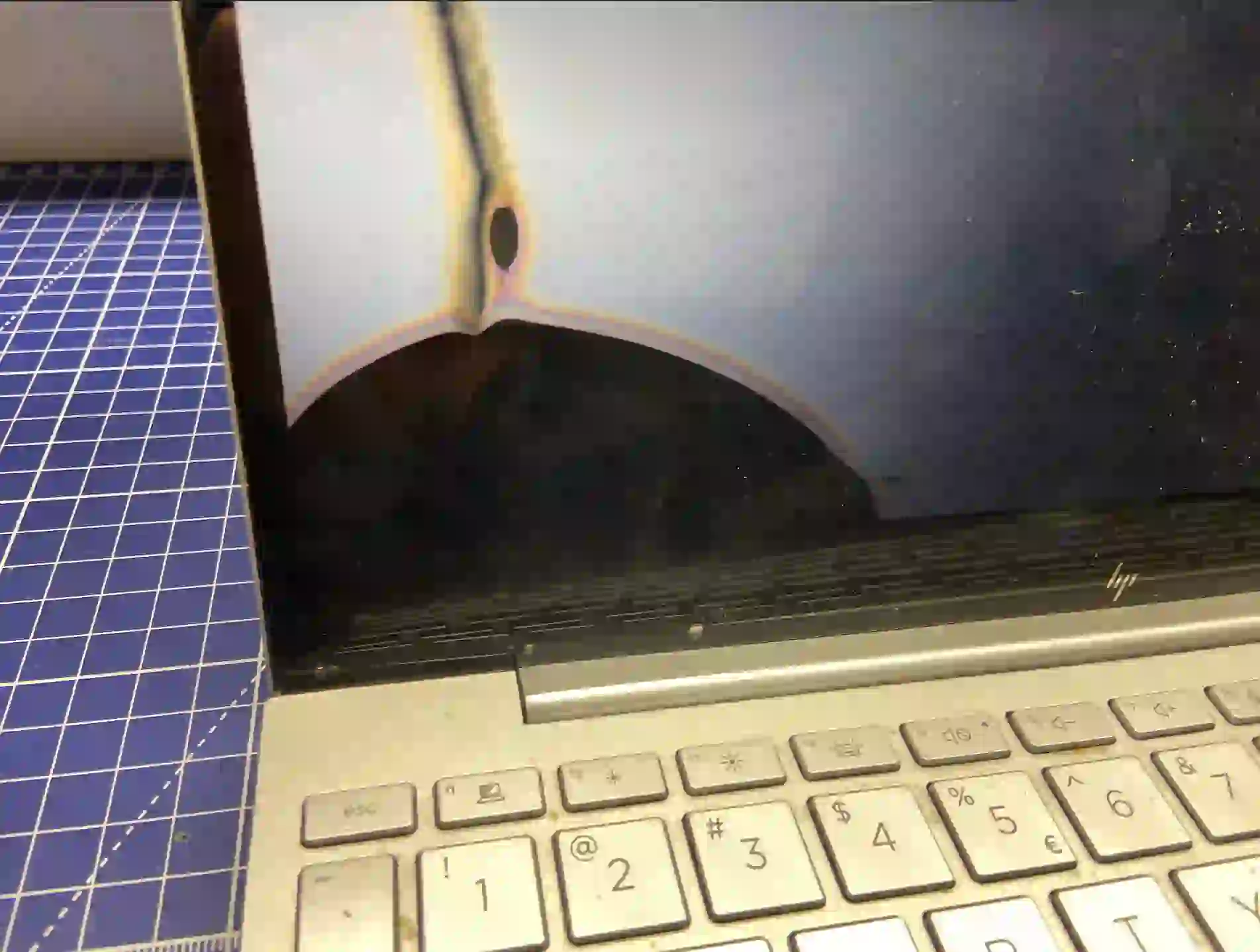
Screen artefacts on a laptop can come from two completely different sources — a damaged graphics card or a damaged screen. This is an important distinction, because repairs for these two problems in Warsaw look completely different. There’s one simple test that lets you check this yourself, before you even go to a repair centre.
In short: Connect your laptop to an external monitor. If the artefacts look exactly the same as on the laptop screen — it’s the graphics card. If the image on the external monitor is clean, and the problem only appears on the built-in screen and depends on the lid angle — it’s the screen. This is the simplest and most reliable test you can do yourself, without opening the laptop.
Most common causes of the problem
- Damage to the graphics card microchip on the motherboard
- Wear or mechanical damage to the cable or the screen itself
- Laptop overheating, leading over time to graphics card failure
What you can check yourself
Take an HDMI cable (or the appropriate one for your laptop) and connect an external monitor or TV. Run anything that previously showed artefacts. Now compare both screens:
- Artefacts look identical on both screens — it’s the graphics card. The signal coming out of the laptop is already damaged before it reaches any screen.
- The external monitor is clean, the problem is only on the built-in screen — it’s the screen or its cable, especially if the image changes when you move the laptop lid.
This distinction is so reliable because the screen usually fails mechanically — when opening, closing the lid or changing the screen angle, whilst the graphics card generates a damaged image regardless of which screen it’s connected to.
What NOT to do
- Don’t order a new screen straight away if you haven’t done the external monitor test — you might replace a working part
- Don’t ignore artefacts, hoping it’s a „temporary glitch” — if it’s the graphics card, the problem will get worse
- Don’t try pressing or bending the screen to „check” the damage — you might actually damage it
The screen most commonly fails in a way where symptoms only appear when you move it — when opening or closing the lid, when changing the angle. A graphics card produces artefacts even on an external monitor — you connect the laptop and see exactly the same thing. That’s the simplest test.
Apenfix technician
How we diagnose this
1. External monitor test
We repeat your home test under service conditions, on several different screens, to rule out coincidence.
2. Screen cable and display panel check
If we suspect the screen, we check the condition of the cable and connector, moving the lid in a controlled manner.
3. Current draw measurement
If we suspect the graphics card, we measure current draw using a lab power supply to confirm chip failure.
4. Clear answer
We tell you straight whether the problem is the graphics card or the screen, before we propose a repair.
The external monitor test is very reliable, but it doesn’t replace full service diagnostics in cases of unusual damage.
Graphics card and screen diagnostics — we serve all of Warsaw
We accept laptops with suspected graphics card or screen damage from customers in every Warsaw district — Śródmieście, Wola, Mokotów, Ochota, Żoliborz, Bemowo, Bielany, Ursynów, Praga-Południe, Praga-Północ, Targówek, Białołęka, Wawer, Włochy, Ursus, Wilanów, Rembertów and Wesoła — as well as from the surrounding areas.
We have more than one location in convenient parts of Warsaw, so getting to us is quick and easy wherever you live or work. Our current service point addresses are listed further down this page.
Why Apenfix
Frequently asked questions
Will the external monitor test always give a clear answer?
In the vast majority of cases, yes. In unusual situations, the final answer comes from a full service diagnostics.
What if I don’t have an external monitor to hand?
You can come straight in for a free inspection — we’ll do this test on site, together with full diagnostics.
Which is more expensive to repair — the graphics card or the screen?
It depends on the specific case and laptop model. Current rates for both types of repair can be found in the price list.
Can I confuse graphics card symptoms with screen symptoms?
It’s a very common mistake — that’s why the external monitor test is so useful before you decide on a repair.
How long does the repair take once the cause is established?
Most repairs — both screen and graphics card — take 1–3 working days. Replacing the graphics chip can take longer.
The cost of repair depends on whether the problem is with the graphics card or the screen, and on the laptop model. Current rates can be found in the Apenfix price list.
Two service points in Warsaw
Visit whichever of our two locations is more convenient for you.
Location 1 — Wolska
Wolska 50A/Lokal 26
01-187 Warszawa
Location 2 — al. Szucha
al. Jana Chrystiana Szucha 1
00-580 Warszawa
See also
- Motherboard repair — when it’s worth it
- BGA reballing
- Lenovo cooling system cleaning
- Laptop overheating
