
Asus laptop keyboard replacement in Warsaw — keys not responding, typing on their own, or a plastic keycap has broken. We replace just the keyboard, without needing to replace the entire topcase. Repair usually takes 1–3 working days.
In short: Asus laptop keyboard replacement in Warsaw doesn’t have to mean replacing the entire upper casing. In ROG and TUF gaming laptops, the keyboard is sometimes screwed in, which makes servicing easier. In other models, we desolder the old keyboard and fit a new one — without replacing the topcase. Repair usually takes 1–3 working days.
Our experience — Asus keyboard replacements
At our service centre in Warsaw, we’ve carried out 12 keyboard replacements in Asus laptops, and in total we’ve serviced over 200 laptops of this brand — from Vivobooks and Zenbooks to gaming ROG and TUF models.
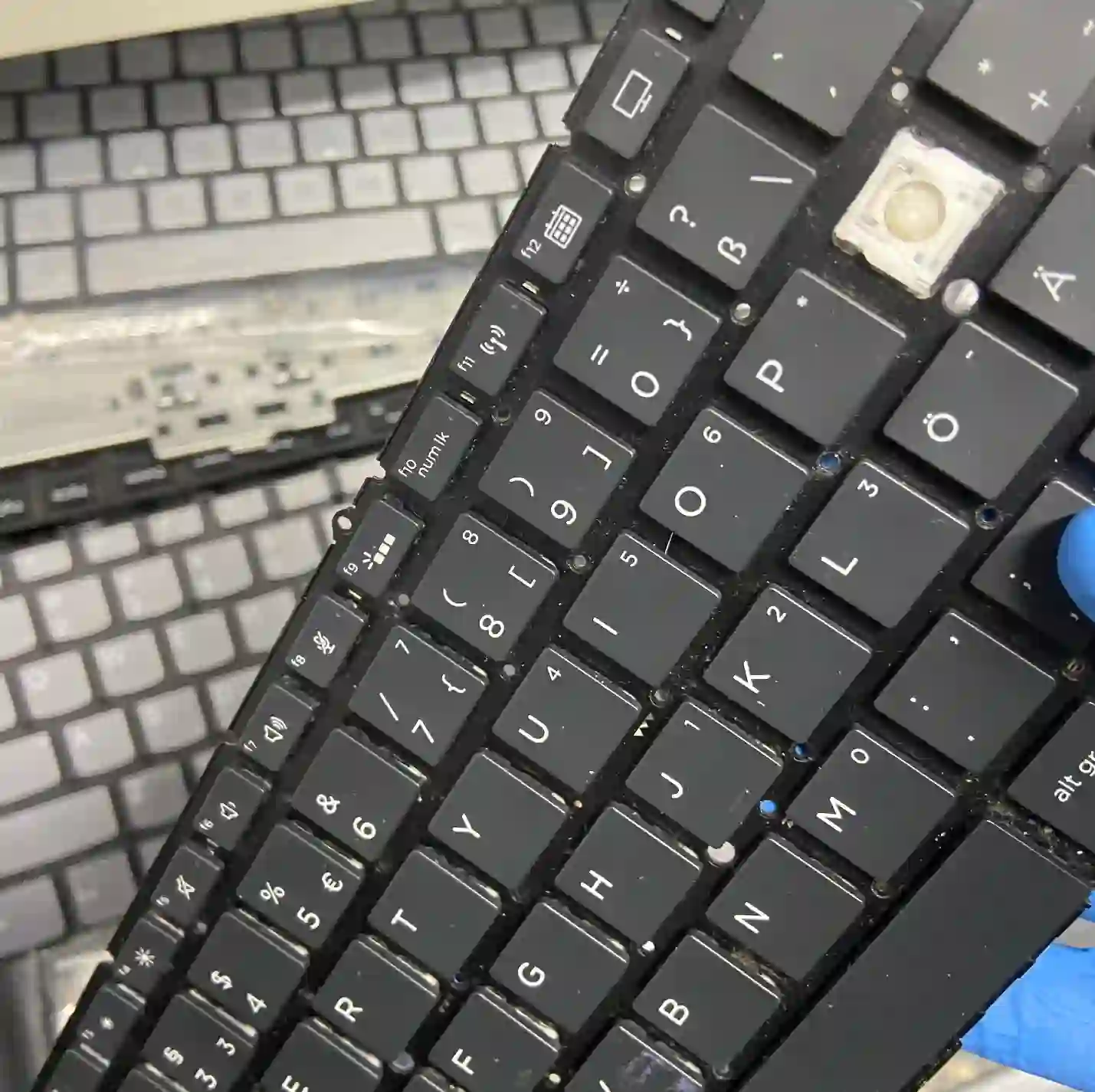
In gaming Asus laptops, the keyboard is sometimes screwed in
This is a rare but very advantageous design feature:
In gaming Asus laptops, as well as in higher-end Dells, keyboards are often simply screwed in rather than soldered to the casing. By comparison — the most difficult replacement is in a MacBook, because there the keyboard is metal-welded to the casing permanently and you have to drill.
Apenfix technician
In practice, this means that if you have a ROG or TUF, keyboard replacement can be simpler and faster than in many other laptops. In models where the keyboard is integrated with the casing, we use desoldering technology — so we still don’t replace the entire topcase.
We replace the keyboard, not the whole topcase
We don’t replace the topcase, because we have the technology that allows us to desolder just the keyboard and fit a new one in its place. This repair works out significantly cheaper than replacing the topcase — why replace the entire upper casing when the problem is just the keyboard. Many service centres don’t have this technology and replace the keyboard together with the casing, which means the customer pays more.
Apenfix technician
When you’re looking for laptop keyboard replacement
You’ve found us if you’re looking for answers to questions like: laptop keyboard not working, keys pressing themselves, laptop key broken, or Asus keyboard replacement price. It’s all one service — keyboard repair or replacement.
Symptoms — what customers most often come in with
- Plastic keycap broken — the keyboard itself works, only the cap is damaged. In new laptops these keycaps are very thin and break easily, especially when someone hits them hard
- Keys don’t type characters despite pressing them
- Keys press themselves — text appears even though you’re not touching anything
- An entire row of keys has stopped working — vertically or horizontally
- Keys stick or only respond after pressing hard
How to recognise what’s actually happened
If a single key isn’t working, there’s a good chance that dust has simply got underneath it and cleaning is all that’s needed. But if an entire strip of keys stops working — vertically or horizontally — it very often means moisture has got in. These keyboards tend to fail in strips like that.
Apenfix technician
This is practical advice that saves money: one key is often just cleaning, an entire row usually means moisture damage and the keyboard needs replacing. If your laptop has suffered liquid damage, time matters — see the liquid damage repair page.
What can be repaired without replacing the keyboard
- Single keycap — we replace just the keycap, this is the cheapest repair
- One non-working key — often cleaning the mechanism is enough
- Moisture damage — here the entire keyboard usually needs replacing
- We always check first whether it can be repaired more cheaply — we tell you straight what’s realistic
How keyboard replacement works at our service centre
1. Diagnosis
We establish whether it’s the keycap, dust, or moisture damage.
2. Checking the construction
We determine whether the keyboard is screwed in or integrated with the housing.
3. Replacement
We unscrew or desolder the old keyboard and install a new one — without replacing the topcase.
4. Testing
We check every key before returning the device.
The above describes how the process works at our service centre. This is not a DIY repair guide — desoldering a keyboard requires a soldering station and experience, so we recommend contacting a service centre.
Asus keyboard replacement — we serve all of Warsaw
We accept Asus laptops with damaged keyboards from customers in every district of Warsaw — Śródmieście, Wola, Mokotów, Ochota, Żoliborz, Bemowo, Bielany, Ursynów, Praga-Południe, Praga-Północ, Targówek, Białołęka, Wawer, Włochy, Ursus, Wilanów, Rembertów and Wesoła — as well as from the surrounding areas.
We have more than one location in convenient parts of Warsaw, so getting to us is quick and easy wherever you live or work. Our current service point addresses are listed further down this page.
Why Apenfix
Frequently asked questions
How much does Asus laptop keyboard replacement cost?
It depends on the scope and construction — in gaming models where the keyboard is screwed in, the repair can be simpler. However, with us you don’t pay for the entire topcase. Current rates can be found in our price list.
Can you replace just one key?
If it’s a cracked plastic keycap — yes, we replace just the keycap. If the problem lies deeper, the entire keyboard needs to be replaced.
One key doesn’t work — is that serious?
Usually not. A single key most often stops working due to dust under the mechanism. It’s worse when an entire row of keys stops working — that’s a typical sign of liquid damage.
Is keyboard replacement easier in ROG and TUF models?
Often yes. In gaming Asus laptops, the keyboard is sometimes screwed in rather than integrated with the chassis, which simplifies the entire repair process.
How long does keyboard replacement take?
Usually 1–3 working days. Replacing a single keycap can often be done on the spot.
Prices for all services can be found in our price list.
Two service points in Warsaw
Visit whichever of our two locations is more convenient for you.
Location 1 — Wolska
Wolska 50A/Lokal 26
01-187 Warszawa
Location 2 — al. Szucha
al. Jana Chrystiana Szucha 1
00-580 Warszawa
