
Have you spilt liquid on your laptop and are now worried about the data stored on it? Time is of the essence — the sooner the laptop or the drive itself reaches us, the greater the chance of data recovery. Repair usually takes 1–3 working days.
In brief: After liquid damage to a laptop, time is of the essence — the sooner the drive reaches the service centre, the greater the chance of recovering data before the residual charge dissipates. If the memory chip has suffered physical damage, data recovery is no longer possible. Service available in Warsaw, repair usually takes 1–3 working days.
Our experience in data recovery after liquid damage
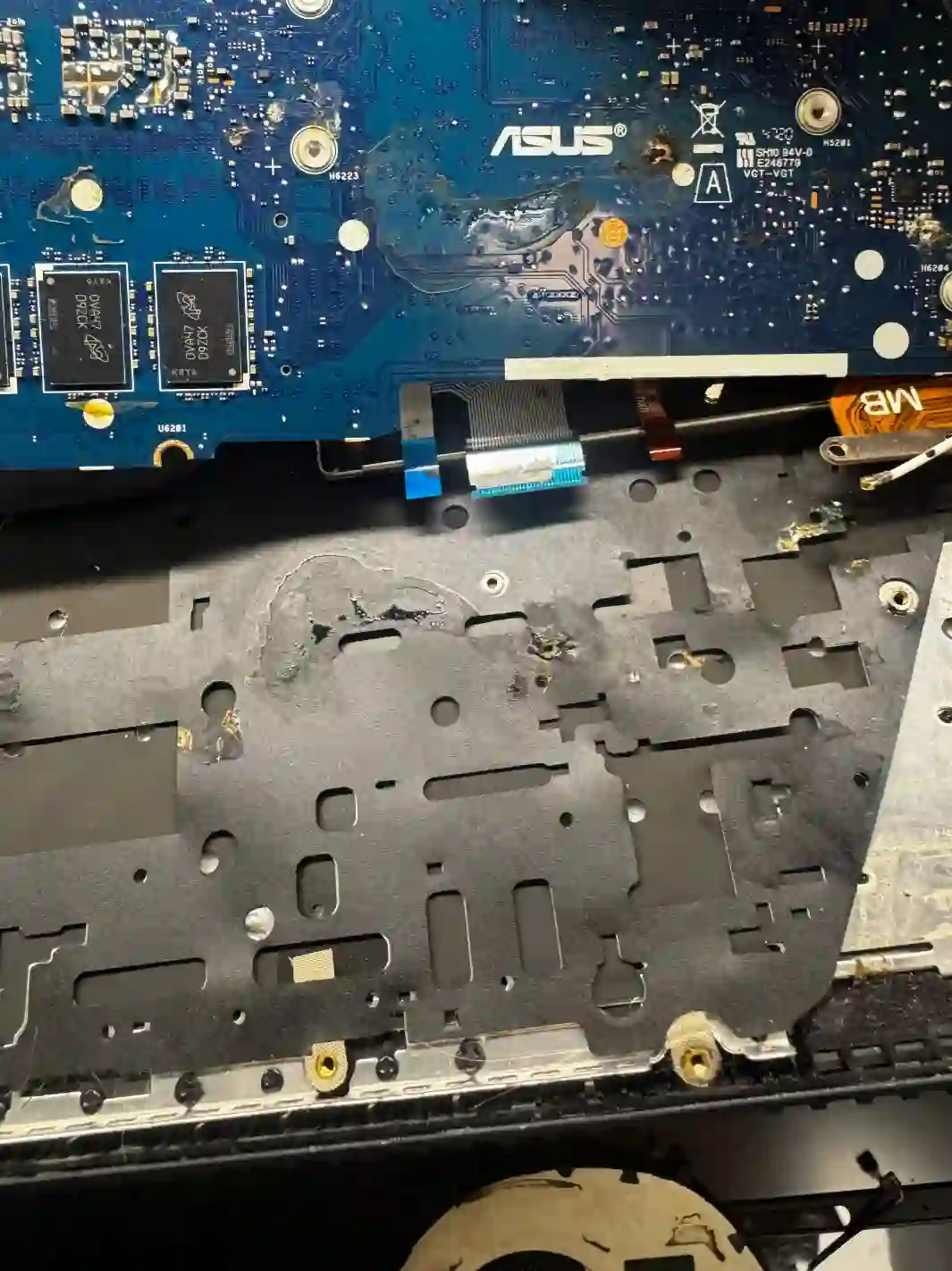
After liquid damage to a laptop, the typical scenario is that the laptop stops booting, and only diagnostics reveal the condition of the drive and its data. For data recovery, we use a custom-built service computer that reads data directly from the memory chip, bypassing damaged components — provided the memory chip itself has not suffered physical damage.
Why speed is crucial here
In an SSD, data can persist as long as there is still residual electrical charge. The longer the laptop sits broken, the greater the risk that the data will become unrecoverable. That’s why with liquid damage we always recommend bringing the device to the service centre as quickly as possible, rather than waiting or attempting to dry and start it yourself.
When you’re looking for data recovery after liquid damage
We usually see people who search online for: „spilt water on laptop what to do”, „data recovery after liquid damage Warsaw” or „laptop won’t turn on after water damage”. If you recognise your situation in these phrases, you’ll probably solve it right here with us.
Symptoms — when to act immediately
- Laptop stopped booting right after contact with liquid
- Laptop works, but unstably, after earlier liquid damage
- Smell of burning after liquid damage
- Visible signs of corrosion around ports or keyboard
- Laptop was damaged by liquid some time ago and has only now stopped working
After liquid damage, every hour counts. If the laptop reaches us quickly, before the residual charge on the drive dissipates, the chances of data recovery are significantly higher than after several days of delay.
Apenfix technician
What not to do after laptop water damage
What you do immediately after liquid damage makes a big difference to the chances of data recovery:
- Don’t try to turn the laptop back on if it has already shut down
- Don’t dry it using household methods (e.g. a hairdryer) — high temperature can make the situation worse
- Don’t save anything to the drive or reinstall the operating system
- Bring the laptop to the service centre as quickly as possible
How data recovery after liquid damage works at our service centre
1. Free inspection
We check the condition of the drive and other components after liquid damage before proceeding with further steps.
2. Quote before we start
We provide an exact price based on the amount of data and the type of damage — the price will not change.
3. Data reading
Using our custom service computer, we read the data directly from the memory chip.
4. Delivery of recovered data
We copy the recovered data to a storage device and hand it over to the customer.
Above we describe how the process works at our service centre. This is not a DIY repair guide — attempting to dry or turn on a water-damaged laptop yourself can make the situation worse, so we recommend bringing it to our service centre as soon as possible.
Data recovery after liquid damage — we serve all of Warsaw
We accept water-damaged laptops for data recovery from customers in every district of Warsaw — Śródmieście, Wola, Mokotów, Ochota, Żoliborz, Bemowo, Bielany, Ursynów, Praga-Południe, Praga-Północ, Targówek, Białołęka, Wawer, Włochy, Ursus, Wilanów, Rembertów and Wesoła — as well as from the surrounding areas.
We have more than one location in convenient parts of Warsaw, so getting to us is quick and easy wherever you live or work. Our current service point addresses are listed further down this page.
Why Apenfix
Frequently asked questions
What should you do immediately after spilling liquid on your laptop?
Don’t turn it back on, don’t try drying it with home methods, and bring it to our service centre as soon as possible — time is crucial for the chances of data recovery.
Can data always be recovered after liquid damage?
Not always. If the memory chip has been physically burnt out, data recovery is no longer possible. We assess the condition of the device during a free inspection.
Why is time so critical when it comes to liquid damage?
On an SSD, data can persist as long as there’s residual electrical charge — the longer the device sits broken, the greater the risk of permanent data loss.
How much does data recovery after liquid damage cost?
The price depends on the amount of data and the type of damage. We provide an exact quote before starting work, and it doesn’t change afterwards.
How long does data recovery after liquid damage take?
Recovery usually takes 1–3 working days; in more complex cases, we agree on the timeframe individually after diagnostics.
Prices for all services can be found in our price list.
Two service points in Warsaw
Visit whichever of our two locations is more convenient for you.
Location 1 — Wolska
Wolska 50A/Lokal 26
01-187 Warszawa
Location 2 — al. Szucha
al. Jana Chrystiana Szucha 1
00-580 Warszawa
See also
- SSD data recovery
- Motherboard trace repair
- Motherboard short circuit repair
- Lenovo motherboard repair
