
The HDD hard drive in your laptop has stopped working or is making strange noises, and you have important data on it? HDDs are usually easier to recover than SSDs, thanks to a completely different recording technology. Repair typically takes 1–3 working days.
In brief: We recover data from HDD hard drives that have stopped working or are damaged. Thanks to a completely different recording technology than SSDs, data recovery from HDDs is usually simpler and more effective — in most cases it succeeds. Service available in Warsaw, repair typically takes 1–3 working days.
Our experience in HDD data recovery
Most often we receive laptops that won’t start at all — and after diagnostics it turns out the problem lies with the drive. With HDD drives, unlike SSDs, we’re dealing with magnetic recording technology on platters, which in practice makes data recovery much easier when the drive isn’t mechanically damaged.
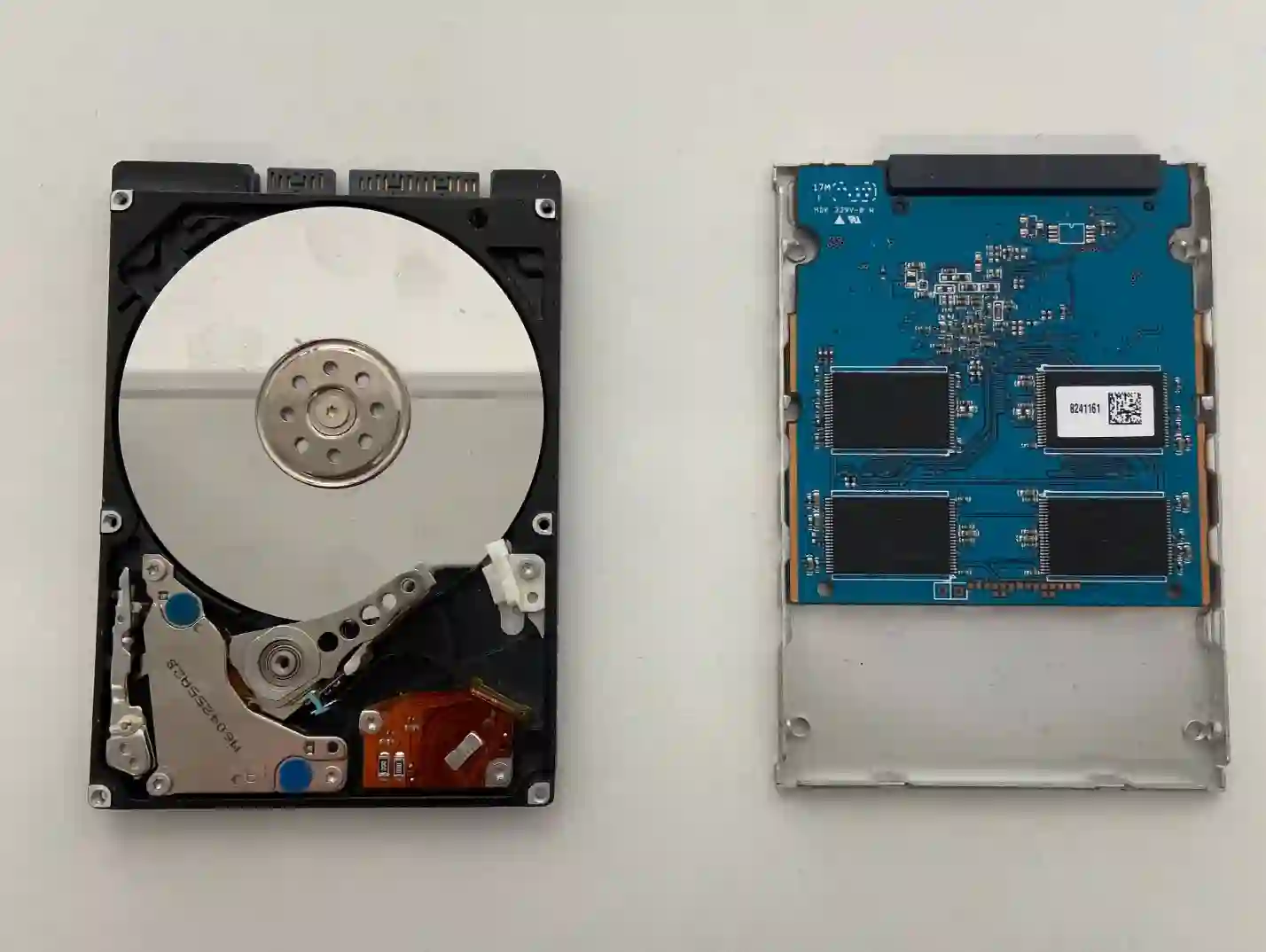
HDD compared to SSD — different technology, different success rate
In an SSD, data is stored in flash memory cells, which wear out over time and can be harder to read after damage. An HDD records data magnetically on spinning platters — a completely different technology, far easier to recover, if the platter itself isn’t physically damaged. Compared to SSDs, data recovery from HDDs is simply easier.
When you’re looking for HDD data recovery
Usually people come to us who search online for: „hard drive not detected”, „HDD data recovery Warsaw” or „laptop doesn’t see hard drive”. If you recognise your situation in these phrases, you’ll probably solve it right here with us.
Symptoms — when to consider HDD data recovery
- Laptop won’t start at all, and diagnostics points to the drive
- Drive makes unusual noises, e.g. clicking or grinding
- System doesn’t see the drive or data partitions
- Windows reports read errors while working on the drive
- Drive was running slower than usual before it stopped being detected
Compared to SSDs, data recovery from HDDs is genuinely an „easier” matter — as long as we’re talking about a drive without mechanical damage. Magnetic storage technology simply lends itself better to data recovery.
Apenfix technician
What not to do when you suspect data loss from an HDD
What you do right after noticing the problem makes a big difference to the chances of data recovery:
- Don’t write anything new to that drive
- Don’t reinstall Windows
- If the drive is making unusual sounds, stop turning it on and off
- Bring your laptop to the service as soon as possible
How HDD data recovery works at our service
1. Free drive inspection
We check whether the damage is mechanical or if the drive has simply stopped being read.
2. Quote before we start
We give you an exact price based on the amount of data and type of damage — the price won’t change after that.
3. Data reading
We read the data from the drive using the right tools matched to the type of damage.
4. Handing over the recovered data
We copy the recovered data to a storage device and hand it over to the customer.
The above describes how the process works at our service centre. This is not a DIY guide — attempting to recover data from a faulty HDD yourself can permanently destroy it, so we recommend bringing your laptop to our service without tampering with the drive.
HDD data recovery — we serve all of Warsaw
We accept HDDs for data recovery from customers in every district of Warsaw — Śródmieście, Wola, Mokotów, Ochota, Żoliborz, Bemowo, Bielany, Ursynów, Praga-Południe, Praga-Północ, Targówek, Białołęka, Wawer, Włochy, Ursus, Wilanów, Rembertów and Wesoła — as well as from the surrounding areas.
We have more than one location in convenient parts of Warsaw, so getting to us is quick and easy wherever you live or work. Our current service point addresses are listed further down this page.
Why Apenfix
Frequently asked questions
Is HDD data recovery easier than SSD?
Yes, due to the different magnetic recording technology, data recovery from an HDD without mechanical damage is usually simpler and more successful.
The drive is making strange noises — can data still be recovered?
This may indicate mechanical damage. In such cases, the chances are lower and laboratory conditions may be required — we assess this accurately after inspection.
How much does HDD data recovery cost?
The price depends on the amount of data and the type of damage. We provide an exact quote before starting work, and it does not change afterwards.
What should I do if the HDD is no longer being detected?
Do not write anything to the drive and bring your laptop to the service centre as soon as possible — further attempts to start it may reduce the chances of data recovery.
How long does HDD data recovery take?
Recovery usually takes 1–3 working days; in more complex cases, we determine the timeframe individually after diagnostics.
Prices for all services can be found in our price list.
Two service points in Warsaw
Visit whichever of our two locations is more convenient for you.
Location 1 — Wolska
Wolska 50A/Lokal 26
01-187 Warszawa
Location 2 — al. Szucha
al. Jana Chrystiana Szucha 1
00-580 Warszawa
See also
- SSD data recovery
- BitLocker drive data recovery
- Data recovery after liquid damage
- Dell drive replacement
