
Is your Hyperbook laptop running loud, overheating, or shutting down under load? We clean the cooling system and replace the thermal paste, restoring proper operating temperatures. Repair usually takes 1–3 working days.
In short: We clean the cooling system in Hyperbook laptops — removing dust from heatsinks and fans and replacing dried-out thermal paste on the processor and graphics card. This solves problems with loud fan noise, overheating, and unexpected shutdowns under load. Service available in Warsaw, repair usually takes 1–3 working days.
Our experience with cooling systems in Hyperbook laptops
Hyperbook is a Polish manufacturer of gaming laptops, building models based on Clevo barebone designs. These designs are often well-engineered for cooling system servicing, but the components themselves — heatsinks, fans, mounting elements — are specific to each barebone platform, so when cleaning and replacing thermal paste we draw on our experience working with these types of designs.
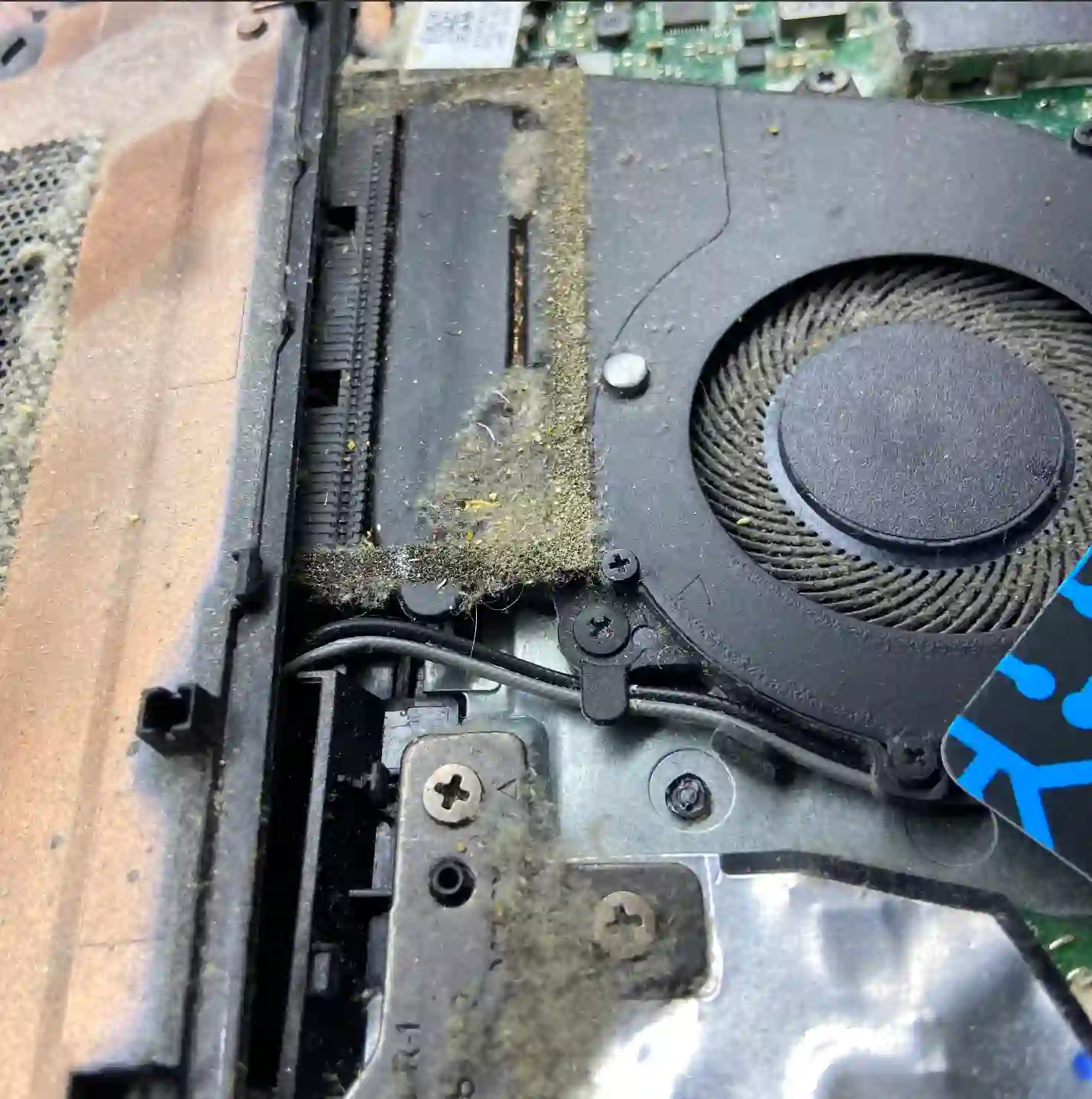
Clevo barebone design and parts availability
Hyperbook models are based on ready-made Clevo barebone platforms, which on one hand provides a solid, proven cooling system design, and on the other means that components such as heatsinks and fans are precisely matched to a specific platform and are not always as readily available as with mass-produced brands. That’s why when cleaning the cooling system in a Hyperbook we take particular care not to damage the original mounting elements during disassembly.
When you’re looking for Hyperbook cooling system cleaning
People usually find us by searching online for: „Hyperbook laptop running loud”, „Hyperbook overheating”, or „gaming laptop cooling cleaning Warsaw”. If you recognise your situation in these phrases, you’ll probably solve it right here with us.
Symptoms — when it’s worth cleaning the cooling system
- Fan runs loud even during simple tasks
- Laptop gets very hot, especially around the keyboard area
- Performance drops during gaming or rendering (thermal throttling)
- Laptop shuts down unexpectedly under load
- Cooling system hasn’t been cleaned for a long time
In Clevo barebone systems, which Hyperbook is based on, it’s crucial to understand the exact heatsink assembly construction — the screw tightening sequence and heat distribution differ from typical office laptops. We do this carefully to avoid damaging the original components.
Apenfix technician
What happens if you delay cooling system cleaning
Clogged cooling won’t fix itself — over time, dust accumulates more heavily, and dried-out thermal paste loses its properties. Delaying usually results in:
- CPU and graphics card temperatures rise, and performance drops
- The laptop shuts down on its own more and more often due to overheating
- Fans run at maximum speed almost constantly
- Prolonged overheating shortens the lifespan of components on the motherboard
How Hyperbook cooling system cleaning works at our service centre
1. Free inspection
We check operating temperatures and assess the cooling system’s condition before disassembly.
2. Barebone disassembly
We carefully remove the casing and heatsink, adapting the sequence to the specifics of the Clevo platform.
3. Cleaning and new thermal paste
We remove dust from the heatsinks and fans, and apply new thermal paste to the CPU and graphics card.
4. Reassembly and stress test
We reassemble the laptop and check temperatures under load before passing it to quality control.
Above we describe how the process looks in our service centre. This is not a DIY repair guide — disassembling a barebone chassis requires knowledge of the specific platform, so we recommend bringing your laptop to a service centre.
Hyperbook cooling system cleaning — we serve all of Warsaw
We accept Hyperbook laptops for cooling system cleaning from customers in every Warsaw district — Śródmieście, Wola, Mokotów, Ochota, Żoliborz, Bemowo, Bielany, Ursynów, Praga-Południe, Praga-Północ, Targówek, Białołęka, Wawer, Włochy, Ursus, Wilanów, Rembertów and Wesoła — as well as from the surrounding areas.
We have more than one location in convenient parts of Warsaw, so getting to us is quick and easy wherever you live or work. Our current service point addresses are listed further down this page.
Why Apenfix
Frequently asked questions
Why is my Hyperbook so loud?
The most common cause is dust blocking the radiator and fan, or dried-out thermal paste — the fan then spins faster to compensate for poorer heat dissipation.
Does the Clevo barebone chassis make cooling system cleaning more difficult?
It doesn’t make it more difficult, but it does require knowledge of the specific platform — the disassembly sequence and heatsink mounting differ from typical office laptops, which is why we rely on our experience working with these types of chassis.
How often should I clean the cooling system in a gaming laptop?
It depends on usage conditions, but for gaming laptops we recommend checking the cooling system every 12–18 months, especially if the laptop operates in dusty environments or around pet hair.
How long does Hyperbook cooling system cleaning take?
The repair usually takes 1–3 working days.
How much does Hyperbook cooling system cleaning cost?
You’ll find current rates in our price list — we always provide an exact quote after a free inspection.
Prices for all services can be found in our price list.
Two service points in Warsaw
Visit whichever of our two locations is more convenient for you.
Location 1 — Wolska
Wolska 50A/Lokal 26
01-187 Warszawa
Location 2 — al. Szucha
al. Jana Chrystiana Szucha 1
00-580 Warszawa
See also
- Motherboard repair — when is it worth it
- Dell Case Repair
- CPU Replacement
- Warranty and Quality Control for Repairs
