
Cooling system cleaning for Gigabyte laptops at Apenfix solves the problem of a loud fan, laptop overheating and so-called thermal throttling — a drop in performance under load. We don’t just blow out the dust — we clean the cooling system thoroughly. Repair usually takes 1–3 working days.
In brief: Cooling system cleaning for Gigabyte laptops at Apenfix includes temperature measurement, complete disassembly and cleaning of the fan (not just blowing it out), and thermal paste replacement — for more powerful models we use phase-change thermal paste or liquid metal. After reassembly we always test the laptop under load. The service comes with a minimum 3-month warranty.
Our experience — cooling systems in Gigabyte laptops
We’ve cleaned the cooling systems in Gigabyte laptops multiple times, covering various models of this brand. We record every repair in our own integrated service database, so knowledge about specific designs isn’t tied solely to one technician’s memory. Some of our technicians are graduates of the Military University of Technology (WAT) in electronics and telecommunications.
Gigabyte — what we pay attention to with this brand
The general rule we follow with less popular brands is: the newer the laptop, the harder it is to repair, because the availability of replacement parts is lower. Gigabyte is a niche brand in the laptop market compared to HP, Acer, Dell or Lenovo, so with newer models we always check the availability of original cooling components first before undertaking the repair. However, this doesn’t limit the cleaning itself and thermal paste replacement — we perform these tasks regardless of parts availability.
When you’re looking for Gigabyte cooling system cleaning
You usually land on this page by typing something into Google like: „Gigabyte laptop loud fan”, „Gigabyte overheating”, „gaming laptop throttling” or „laptop cooling cleaning price”. A loud fan rarely goes away on its own — it usually means dust and dried-out thermal paste.
Symptoms — when Gigabyte cooling needs cleaning
- The fan runs very loudly, even during simple tasks
- The keyboard gets hot, especially in the middle or on the side
- The laptop shuts down by itself during more intensive work
- Performance drops under load (throttling)
- The fan spins unevenly or makes additional noises
- Laptop is hot on the bottom even during light tasks
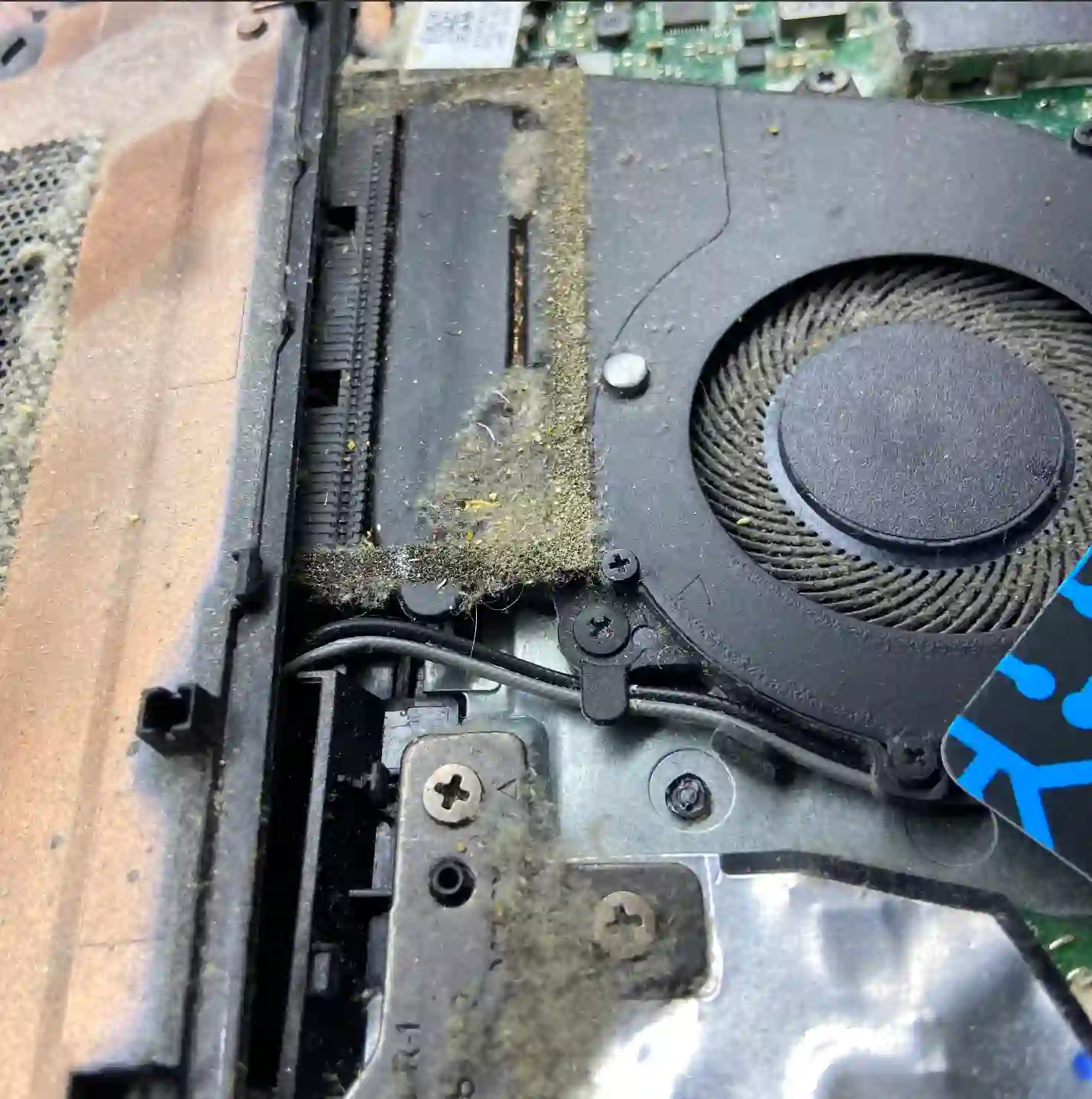
Many customers think it’s enough to blow out the cooling system with compressed air. We always disassemble it completely, clean it thoroughly and replace the thermal paste — without this, temperatures only return to normal for a short while.
Apenfix technician
What happens if you delay cooling system cleaning
A clogged cooling system dissipates heat worse and worse over time, and the rising temperature starts to strain other components.
- The graphics card or processor may become damaged
- Overheating can damage the motherboard itself
- High temperature promotes battery swelling
- A fan running under constant load wears out faster
How Gigabyte cooling system cleaning works at our service centre
1. Temperature measurement
We check operating temperatures before starting the repair to assess the scale of the problem.
2. Disassembly and cleaning
We remove the fan completely and clean it thoroughly, instead of just blowing it out.
3. Thermal paste replacement
We always replace the paste, and in more powerful models we use phase-change thermal paste or liquid metal.
4. Load testing
We check the temperatures after reassembly by running the laptop under load.
The above describes how the process works at our service centre. This is not a DIY repair guide — incorrect disassembly of the cooling system or improperly applied thermal paste can make your laptop’s operating temperatures worse.
Gigabyte laptop cooling system cleaning — we serve all of Warsaw
We accept Gigabyte laptops for cooling system cleaning from customers in every Warsaw district — Śródmieście, Wola, Mokotów, Ochota, Żoliborz, Bemowo, Bielany, Ursynów, Praga-Południe, Praga-Północ, Targówek, Białołęka, Wawer, Włochy, Ursus, Wilanów, Rembertów and Wesoła — as well as from the surrounding areas.
We have more than one location in convenient parts of Warsaw, so getting to us is quick and easy wherever you live or work. Our current service point addresses are listed further down this page.
Why Apenfix
Frequently asked questions
How often should I have my Gigabyte laptop’s cooling system cleaned?
It depends on how intensively you use it, but a loud fan or rising temperatures are a sign it’s time for a cleaning.
Is thermal paste alone enough, or does the whole fan need cleaning?
We always remove the fan completely and clean it thoroughly — just blowing it out or replacing the paste without cleaning only works for a short time.
Is parts availability for Gigabyte laptop cooling systems a problem?
Gigabyte is a less popular brand than HP, Acer, Dell or Lenovo, so with newer models we always check the availability of original components before starting the repair.
What warranty do you offer on cooling system cleaning?
We provide a minimum 3-month warranty on the service performed.
How long does Gigabyte laptop cooling system cleaning take?
Usually 1–3 working days, depending on the availability of any replacement parts.
Prices for all services can be found in our price list.
Two service points in Warsaw
Visit whichever of our two locations is more convenient for you.
Location 1 — Wolska
Wolska 50A/Lokal 26
01-187 Warszawa
Location 2 — al. Szucha
al. Jana Chrystiana Szucha 1
00-580 Warszawa
See also
- Gigabyte laptop diagnostics
- Service price list
- Dell cooling system cleaning
- Acer cooling system cleaning
