
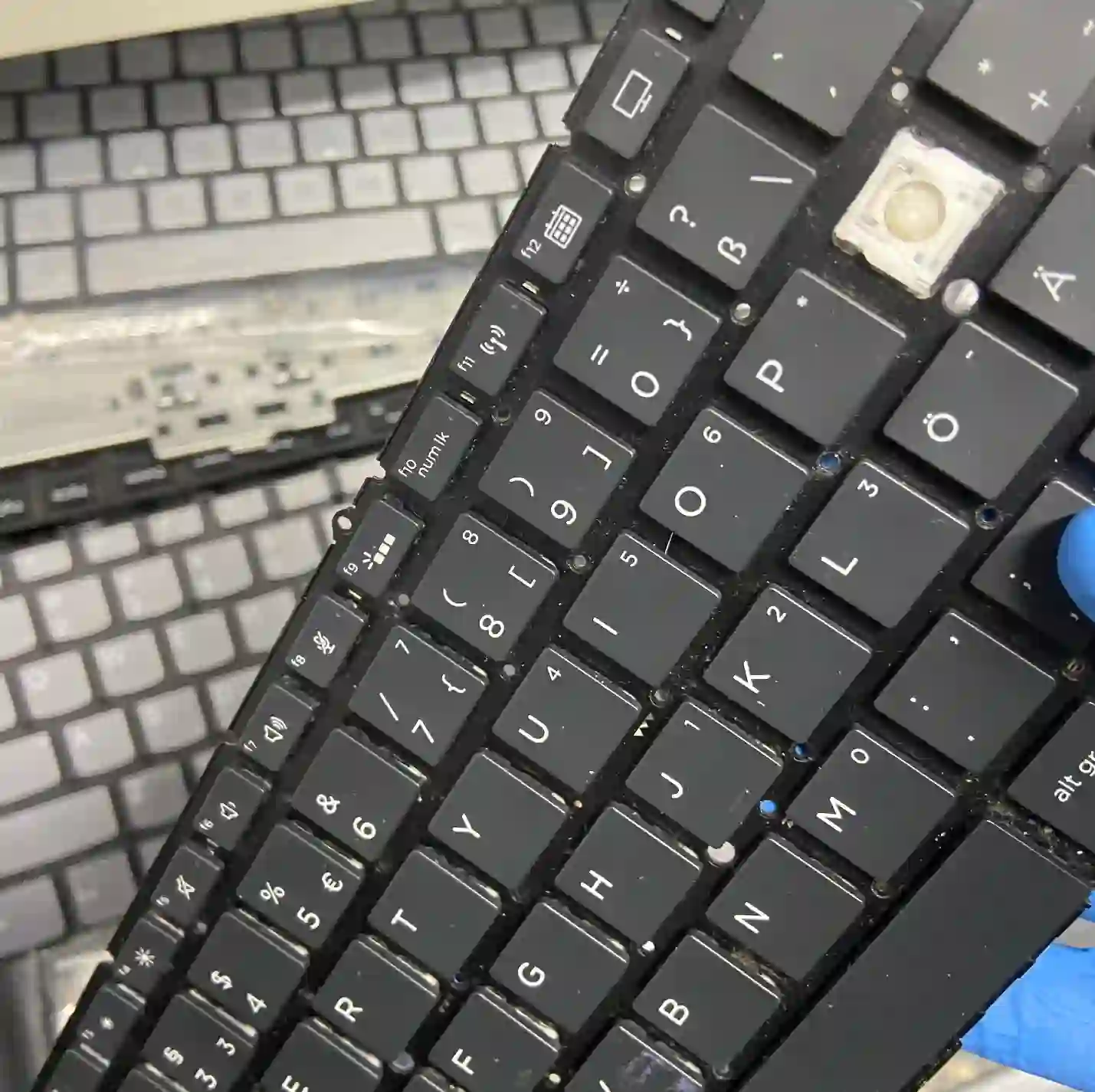
Dell laptop keyboard replacement at Apenfix helps when keys don’t respond, type on their own, or the plastic keycap has cracked. We repair the keyboard without having to replace the entire top case of the laptop. Repair usually takes 1–3 working days.
In brief: Dell laptop keyboard replacement at Apenfix starts with a thorough diagnosis of the cause — if only one key isn’t working, cleaning out dust is usually enough, and if an entire row or section of keys has failed, moisture is usually to blame. Instead of replacing the entire top case, we desolder just the keyboard and fill in any missing elements with 3D printing, which works out significantly cheaper.
Our experience — keyboards in Dell laptops
We’ve repaired around 197 Dell laptops so far, including many from the Inspiron, Latitude and XPS series. We record every repair in our own integrated service database, so we know how keyboards are built in specific Dell models. Some of our technicians are graduates of the Military University of Technology (WAT) in electronics and telecommunications.
Dell — brand specifics in keyboard repair
Dell laptops usually have a slightly more complex internal layout than the competition — even cooling system cleaning in Dells often requires removing the entire motherboard, which shows how tightly packed the components are under the keyboard. For keyboard replacement, this means access can be more time-consuming than in simpler designs, so we always check the condition of the thermal paste in the area as well — in Dells it dries out faster than in other brands, and since we’re opening the laptop anyway, it’s worth doing in one visit.
When you’re looking for Dell keyboard replacement
You usually land on this page by typing something into Google like: „Dell keys pressing themselves”, „Dell Latitude keyboard not working”, „cracked key Dell Inspiron” or „laptop keyboard repair Warsaw”. Before you decide on a replacement, it’s worth checking whether the problem affects one key or an entire area — these are completely different scopes of repair.
Symptoms — when a Dell keyboard needs repair
- Single key doesn’t respond or responds unreliably
- Entire row or section of keys stopped working at once
- Keys type on their own, without being pressed
- Plastic keycap is cracked or has come off
- Keyboard works slower or with delay
- You suspect liquid has spilled on the keyboard
If only one key isn’t working, in most cases it’s just dust and cleaning is enough. If an entire row or strip of keys isn’t working, it’s almost always moisture — keyboards „die in strips”. Instead of replacing the entire top case, we desolder just the keyboard and 3D-print any missing parts — it works out much cheaper.
Apenfix technician
What happens if you delay keyboard repair
A damaged keyboard rarely fixes itself, and if moisture is the cause, the problem may spread to other areas over time.
- Moisture under the keyboard can eventually reach the motherboard
- Keys typing on their own make it difficult to work normally on the laptop
- A cracked keycap can lead to further damage to the mechanism
- The area of non-working keys may expand over time
How Dell keyboard replacement works at our service centre
1. Diagnosing the cause
We determine whether the problem is dust under a single key or moisture affecting an entire strip.
2. Cleaning or desoldering
If it’s dirt, we clean the key; if it’s moisture, we desolder the keyboard without touching the top case.
3. Replacing missing parts
We 3D-print any missing keycaps or mounting parts, matching them to the model.
4. Test wszystkich klawiszy
We test every key after the repair to rule out any hidden faults.
The above describes the process at our service centre. This is not a DIY repair guide — desoldering a keyboard requires precision equipment, and attempting it yourself can permanently damage your laptop.
Dell laptop keyboard replacement — we serve all of Warsaw
We accept Dell laptops with damaged keyboards from customers in every Warsaw district — Śródmieście, Wola, Mokotów, Ochota, Żoliborz, Bemowo, Bielany, Ursynów, Praga-Południe, Praga-Północ, Targówek, Białołęka, Wawer, Włochy, Ursus, Wilanów, Rembertów and Wesoła — as well as from the surrounding areas.
We have more than one location in convenient parts of Warsaw, so getting to us is quick and easy wherever you live or work. Our current service point addresses are listed further down this page.
Why Apenfix
Frequently asked questions
Does replacing the keyboard require replacing the entire casing?
No. We desolder just the keyboard without replacing the entire top case, which is a much cheaper solution.
Only one key doesn’t work — is this a serious fault?
Usually not. A single non-working key is most often just dust, and cleaning it is enough — no need to touch the entire keyboard.
An entire row of keys stopped working at once — what does this mean?
Most often this is caused by moisture affecting an entire row of keys rather than a single key — such a fault must be repaired by desoldering the keyboard.
Can a missing keycap be recreated?
Yes, we 3D-print missing keyboard parts, matching them to the specific Dell model.
How long does a Dell laptop keyboard replacement take?
Usually 1–3 working days, depending on whether only cleaning is needed or full keyboard desoldering.
Prices for all services can be found in our price list.
Two service points in Warsaw
Visit whichever of our two locations is more convenient for you.
Location 1 — Wolska
Wolska 50A/Lokal 26
01-187 Warszawa
Location 2 — al. Szucha
al. Jana Chrystiana Szucha 1
00-580 Warszawa
See also
- Dell laptop diagnostics
- Dell battery replacement
- Dell cooling system cleaning
- Dell motherboard repair
