
Asus laptop liquid damage repair in Warsaw — you spilt water, coffee or another liquid on the keyboard and the laptop stopped working or is working incorrectly. We clean the motherboard of corrosion and save the device and your data. Repair usually within 1–3 working days.
In short: Asus laptop liquid damage repair in Warsaw depends above all on reaction time — the sooner it reaches us after the spill, the greater the chance that the motherboard won’t suffer. We check whether a short circuit occurred, clean off corrosion and test all components. Even a laptop that was damaged long ago has a chance of working after cleaning. Repair usually within 1–3 working days.
Our experience — Asus laptop liquid damage repair
At our service centre in Warsaw we have carried out 7 Asus laptop liquid damage repairs. The models that reach us most often are from the Vivobook, Zenbook, ROG and TUF series.
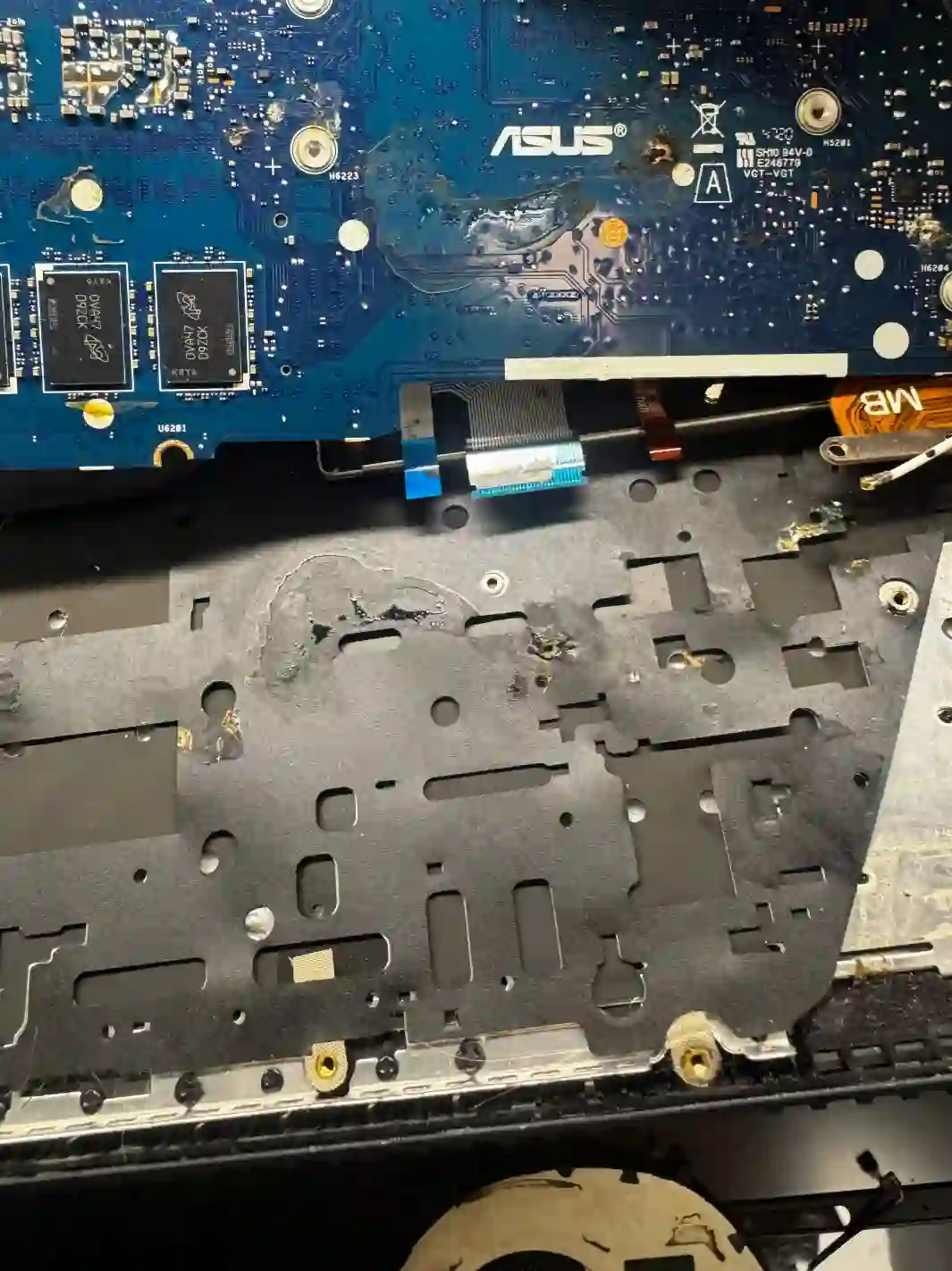
Asus — why the series matters so much here
The construction of Asus laptops differs so much between models that we choose the method of disassembly and cleaning after liquid damage individually for each specific model, not for the brand as a whole. In gaming models from the ROG and TUF series the cooling system is more complex, and in more powerful configurations liquid metal thermal paste is used — that’s why after liquid damage to such a laptop we always check the condition of the cooling system as well, not just the motherboard itself.
When you’re looking for Asus liquid damage repair
You usually land on this page when you’re looking for answers to questions like „I spilt liquid on my Asus laptop what do I do”, „Asus ROG water damage”, „Asus laptop won’t turn on after spill” or „can a water-damaged Asus laptop be saved”. In each of these situations, reaction time is what matters most.
What to do immediately after a spill — before you get to the service centre
- Immediately disconnect the power and turn off the laptop
- Turn the laptop upside down with the affected side facing down so the liquid doesn’t run deeper into the motherboard
- Bring the laptop to the service centre as quickly as possible so we can disconnect the battery — there’s practically no time to spare
- Don’t try to turn the laptop back on before diagnostics
Whether the laptop can be saved depends above all on whether a short circuit occurred on the motherboard. If the laptop reaches us quickly and we clean it quickly, there’s a good chance that either everything will survive, or only a minor component will stop working, for example just the keyboard itself.
Apenfix technician
What happens if you delay after liquid damage
Liquid on the motherboard doesn’t just sit there — the longer the laptop remains in this state, the worse it gets.
- The liquid dries out, leaving corrosion on traces and motherboard components
- The risk of short circuits and permanent motherboard damage increases
- Attempting to turn on a water-damaged laptop can worsen the short circuit
- The chance of recovering data from the drive decreases
How Asus liquid damage repair works at our service centre
1. Immediate disassembly
We remove the battery and disassemble the laptop to stop further liquid action on the components.
2. Motherboard cleaning
We remove corrosion and liquid residue from the motherboard and neighbouring components.
3. Component testing
We check with a lab power supply whether individual components work properly after cleaning.
4. Repairing damaged components
We replace or repair components that didn’t survive the liquid damage, such as the keyboard.
Above, we describe how the process works at our service centre. This is not a DIY repair guide — opening and cleaning a water-damaged laptop yourself without proper equipment risks permanent damage to the motherboard.
Asus liquid damage repair — we serve all of Warsaw
We accept liquid-damaged Asus laptops from customers in every Warsaw district — Śródmieście, Wola, Mokotów, Ochota, Żoliborz, Bemowo, Bielany, Ursynów, Praga-Południe, Praga-Północ, Targówek, Białołęka, Wawer, Włochy, Ursus, Wilanów, Rembertów and Wesoła — as well as from the surrounding areas.
We have more than one location in convenient parts of Warsaw, so getting to us is quick and easy wherever you live or work. Our current service point addresses are listed further down this page.
Why Apenfix
Frequently asked questions
Can a water-damaged Asus laptop still be saved?
In many cases yes, even if some time has passed since the spill. After cleaning off the corrosion, the laptop has a chance of working again — the final assessment depends on whether a short circuit occurred.
What should I do immediately after spilling liquid on my laptop?
Immediately disconnect the power, turn off the laptop, flip it upside down with the affected side facing down, and bring it to the service centre as quickly as possible so we can disconnect the battery.
Will the data on the drive survive liquid damage?
If the laptop reaches us quickly, the chances of preserving your data are high. We always try to secure it as a priority.
How much does Asus liquid damage repair cost?
The price depends on the extent of damage identified during diagnostics. You’ll find current rates in our price list.
How long does Asus liquid damage repair take?
Usually 1–3 working days, counting from when diagnostics are completed.
Prices for all services can be found in our price list.
Two service points in Warsaw
Visit whichever of our two locations is more convenient for you.
Location 1 — Wolska
Wolska 50A/Lokal 26
01-187 Warszawa
Location 2 — al. Szucha
al. Jana Chrystiana Szucha 1
00-580 Warszawa
See also
- Asus charging port repair
- Asus cooling system cleaning with liquid metal
- Laptop diagnostics
- Lenovo data recovery
